# 4. One ecosystem, many configurations
*A useful configuration begins with an outcome people recognize.*
## Choose the work before choosing the modules
A community organization asks for an app. Its real challenge is the beginning: people express interest but do not reach their first visit. Some need transport; others are unsure whether they will feel welcome. The organization needs to connect an invitation with useful support.
An initial configuration could combine public resources, a staff introduction, a way to ask questions, and a preparation pathway. The portal supports the team’s content and follow-through; the care app supports an ongoing community. Each part serves the same outcome.
genus is a modular ecosystem. Connected capabilities support publishing, pathways, communities, communication, and engagement review. Configuration determines who uses which tools and how they serve the partner’s purpose. Integration or development may be needed for additional requirements.
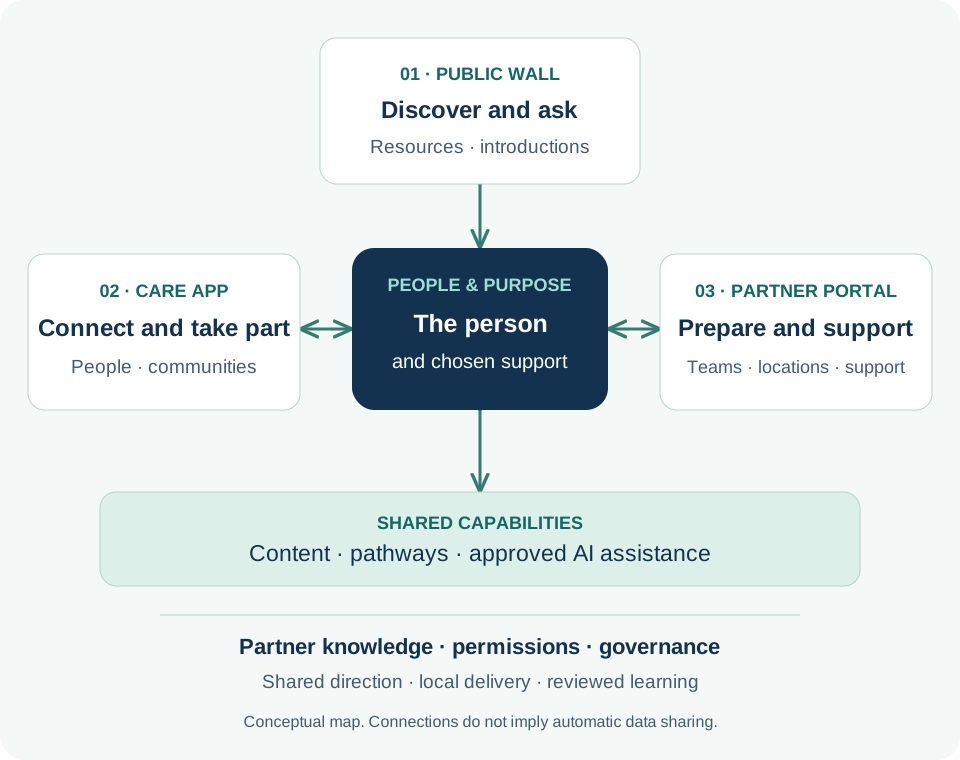
**Figure 4. People and purpose connect the ecosystem** · Connection map
Conceptual configuration map. Connections represent intended relationships, not automatic data sharing or a promise that every module is enabled.
1. The public wall offers a place to discover resources and ask about a service.
2. The care app supports several distinct communities around people and purposes, each with its own context and access.
3. The portal supports personal actions and selected bulk work across communities. Central knowledge and governance guide local delivery; reporting coverage and learning responsibilities are agreed.
## The main surfaces
The **public wall** offers resources through a partner’s website or a dedicated experience, including for people still deciding whether to engage. Public information remains separate from private care information.
The **care app** connects a person, invited supporters, and relevant resources. Someone can participate in several communities with different roles, resources, and access in each. The current community gives a personal interaction its context.
The **partner portal** coordinates communities, content, pathways, campaigns, training, and engagement review. It supports individual work and selected bulk operations so staff can respond personally without rebuilding every resource or repeating every administrative step.
Shared content, communication, AI assistance, permissions, and learning connect these surfaces. A clinical record, a community conversation, and a public article retain their own purposes and access conditions.
## One organizational foundation, many local communities
The intended operating model reaches from a central organization through its departments, locations, and configured programs or subsystems to the communities they serve. Central teams establish approved knowledge, research, care strategies, brand standards, governance, and measurement definitions. Local teams contribute their contacts, resources, language, and understanding of the people involved.
This supports **consistent direction with local relevance**. A shared welcome pathway can provide a starting point for several locations, while each team checks its contact details, service arrangements, and audience. Feedback and reviewed improvements return to the shared knowledge so other teams can learn. Configuration determines organizational scope, permissions, distribution routes, and available reporting; the [portal chapter](genus-book-review.html#chapter-09) explains the practical work.
## A configuration map
The figure places the person and chosen support at the center of the public wall, care app, and portal. Knowledge and governance shape the shared capabilities underneath. Its arrows express intended relationships; access remains governed.
An introductory program might start with public resources and a staff-managed pathway. A family service may add invited supporters; another program may serve the participant directly. Choose the arrangement that fits the relationship the team can maintain.
Configuration includes ownership: who reviews resources, answers questions, explains notifications, and manages transitions when someone leaves. Those decisions make the experience dependable.
## The carePhysics connection
[Technology — Make Help Easier to Reach](https://genusconnect.org/carephysics/book/chapter-08) asks us to consider the effort an experience requires. [Shared Tools, Local Wisdom](https://genusconnect.org/carephysics/book/chapter-13) explains why common tools still need local understanding. Together, they encourage partners to select a manageable arrangement and fill it with knowledge that matters to their audience.
For the community organization, “feel prepared to try one visit” helps the team choose resources, transport steps, and introductions—and gives it an outcome to review.
## Where AI helps
An assistant can draft a configuration brief covering audience, desired experience, resources, and next steps. It can flag gaps such as an invitation that mentions transport without explaining how to arrange it. People review the proposal.
Service capacity, integrations, permissions, clinical boundaries, and operational responsibilities require explicit decisions. AI helps make those decisions visible; the responsible team makes them.
## Bring your knowledge
Describe one experience before naming its modules. Who needs what? Which team can follow through? What should be shared across locations, and what needs local adaptation? Connect each responsibility with the appropriate surface.
Start with an experience the team can maintain. Extend it when learning shows a useful reason and someone can own the work.
### Explore further — Configuration and custom development
Configuration uses supported platform choices. Custom development adds or changes behavior. Integration connects systems through an agreed interface and data arrangement. Each has different responsibilities.
Agree which needs fit existing capabilities, which require adaptation, and which need new work. Decide how updates will be tested and supported while preserving a maintainable shared platform.