Better care. Time returned to people. A stronger Day Center.
genus connects the work of a Day Center with life at home: participants, families, staff, and community partners. Public resources, the partner portal, and the family care app can support one connected journey, from the first inquiry through daily participation and changing needs. Your knowledge and care practices give the technology its purpose. The aim is useful support for people and an organization with the capacity to sustain it.
Illustration of people contributing to care; not a customer portrait.
Useful family communication
Turn reviewed observations into updates families can recognize and discuss. Bring their questions and feedback back to the team, so communication helps the next encounter.
Prepared, supported staff
Connect role-based learning, approved resources, and clear responsibilities. Help staff understand the person and the next step, with human review where judgment matters.
Less duplicated work
Reuse appropriate content and pathways, review uploaded records, and coordinate practical handoffs. AI can help prepare drafts; measure the complete effort, including checking and corrections.
Participation that continues to fit
Make first visits easier to approach and everyday participation more personal. Learn why people stay, pause, or leave, and support appropriate transitions when needs change.
Shared direction. Personal delivery.
Across configured departments and locations, central teams can coordinate branding, approved knowledge, research, care strategies, and governance. Local teams contribute their contacts, resources, and understanding of participants. Agree content distribution, access, reporting coverage, and common measures; use reviewed local learning to improve the shared approach.
A moment that carries home
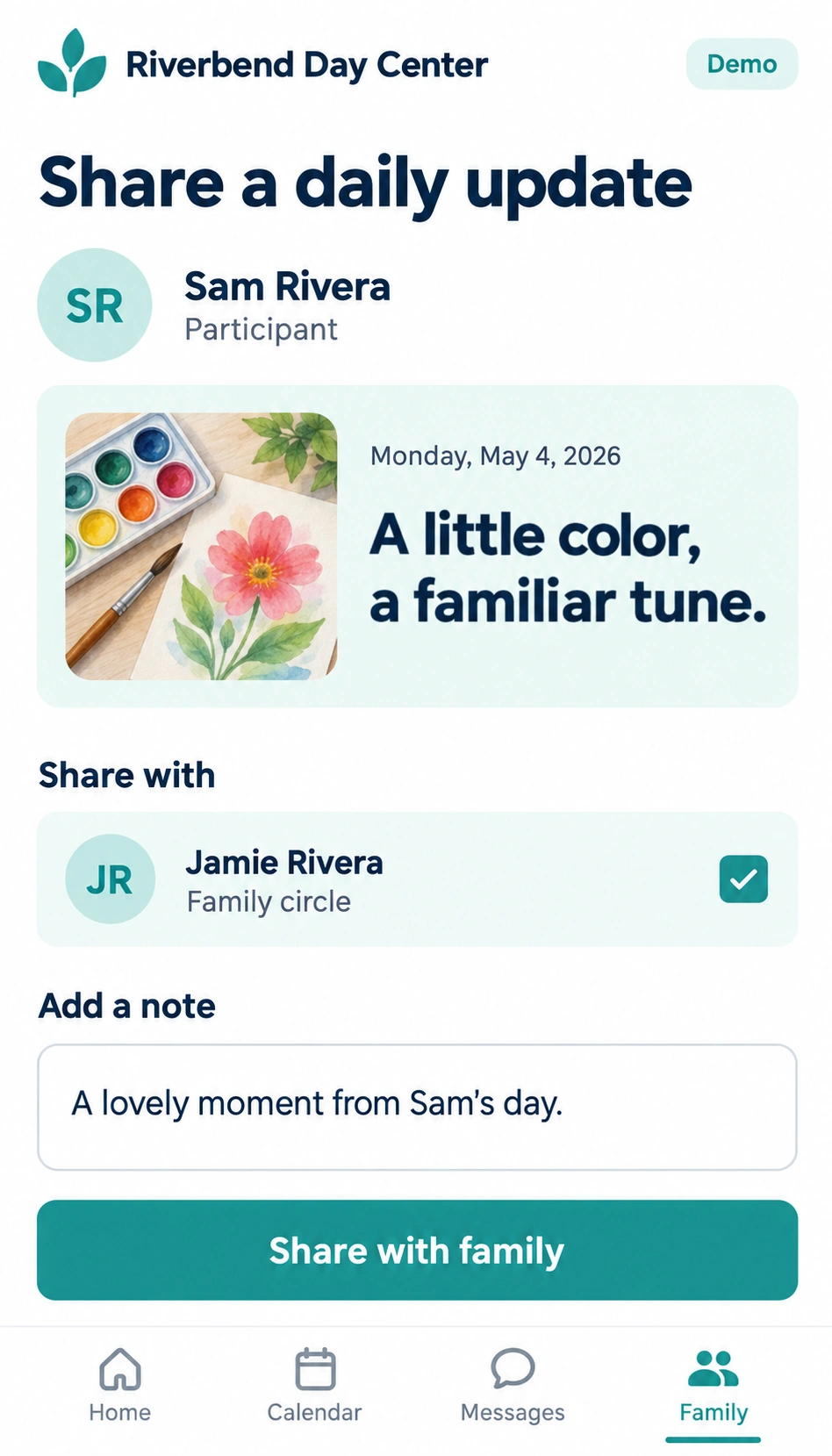
In a fictional example, Sam shares a gardening tip at the center. Staff review the observation and share a useful update with Jamie, a family member. Jamie has something specific to ask about, then offers feedback the team can consider before the next visit.
02 · The connected workflow
One connected care journey
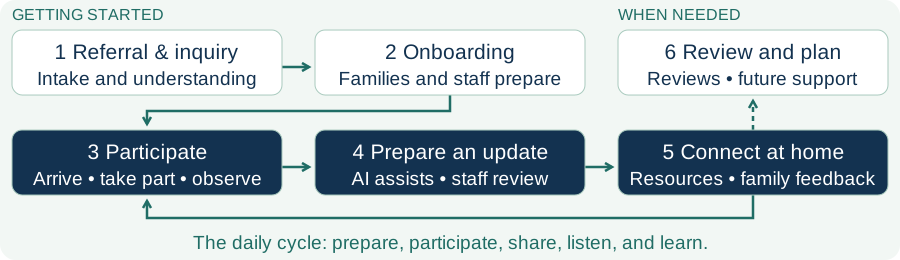
Connect the whole journey while keeping people responsible for decisions and follow-through. The daily cycle repeats; family reviews, doctor conversations, and transitions happen when useful, rather than after every visit.
1. Referral, inquiry, and intakeRespond, understand preferences and needs, and agree participation and sharing through staff-led intake.
2. Onboarding and preparationOrient families, prepare staff, confirm contacts, and provide relevant resources before the first visit.
3. The daily experienceConnect scheduling, check-in, activities, observations, and departure with what matters to the participant.
4. A reviewed updateAI can organize recorded observations; staff check accuracy, meaning, permissions, and recipients before sharing.
5. Life at home and feedbackOffer family communication and education; bring useful responses to the people preparing the next day.
6. Reviews and transitionsPrepare reviewed information for family discussions, family-chosen doctor conversations, and future support arrangements.
Under every stage: governance, approved knowledge, staff training, billing and daily closeout, and accounting support through agreed exports and processes.
Feedback → team review → shared learning → a better next interaction. Connections represent agreed work and permissions, not automatic transfer of private information.
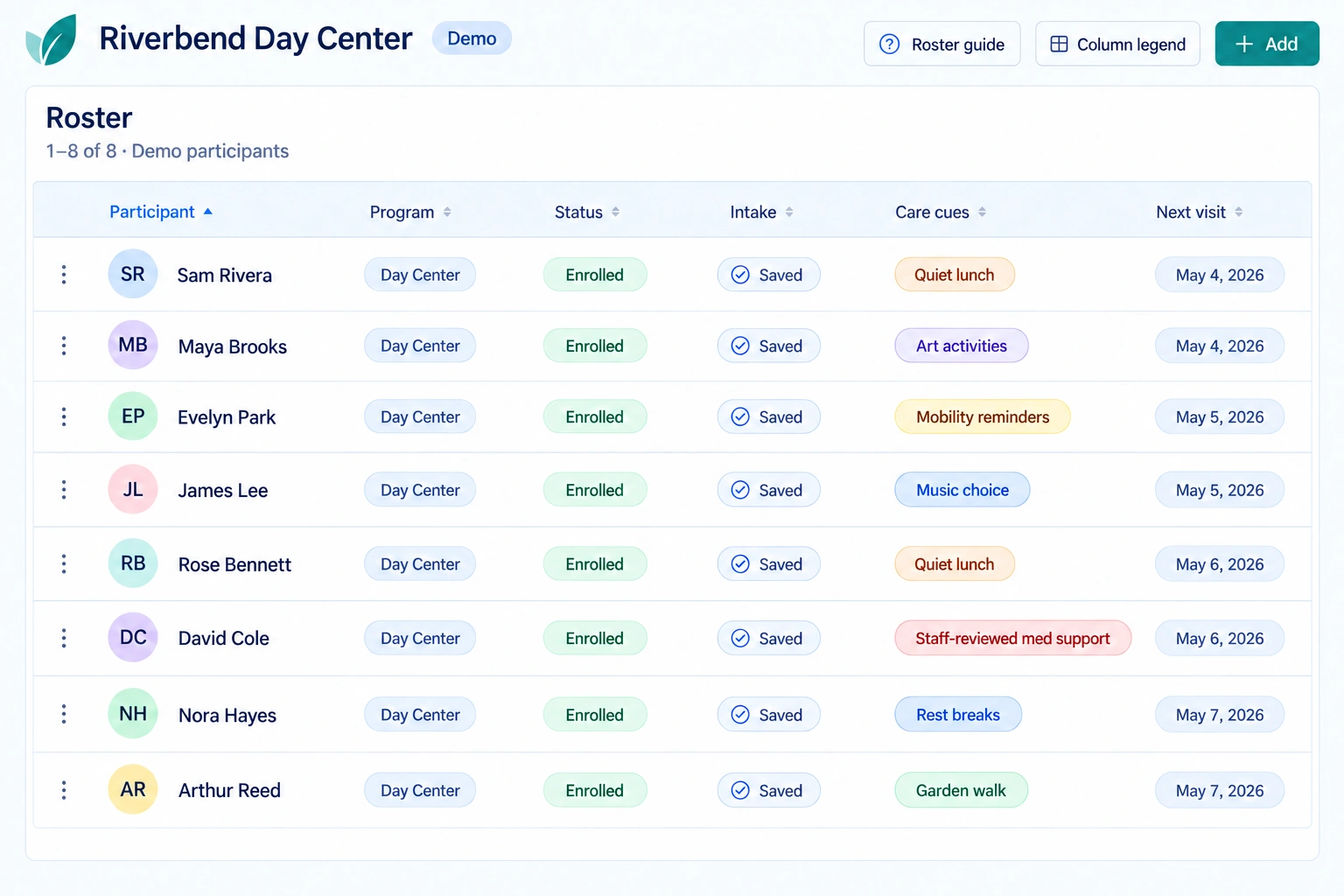
Fictional demonstration: the portal helps staff prepare and follow through.Fictional demonstration: review the update and intended family recipient.
Work personally, without repeating every setup step
Place contacts or pathways into one community or selected communities. Reviewed contact and participant uploads support batch preparation, with validation and exceptions to resolve. Confirm each location’s configuration, responsible people, and supported integrations before use.
03 · Organizational value
Measure what makes the organization stronger
Choose measures that help a decision. Establish comparable baselines, sources, owners, and review periods with the team. These are proposed measures to verify locally—not a live dashboard, promised savings, or customer results.
Starting scorecard: agree a baseline, current result, and next decision.
Area
Practical measures and decisions
Referrals and access
Human response time; eligible referrals reaching first service within an agreed window.
Find barriers between inquiry and a useful first visit.
Quality and family experience
Reported usefulness of support; corrections needed before an update is shared.
Check that faster communication remains accurate and helpful.
Efficiency
Staff minutes per comparable complete workflow; estimated hours returned.
Include preparation, review, correction, sharing, and follow-up.
Training
Current role requirements and observed readiness, assessed separately.
Look beyond completion clicks to supported practice.
Continuity
Participant retention and staff retention as separate starting-cohort measures.
Review reasons; recognize successful transitions and planned endings.
Partner and community connection
Accepted handoffs; person-confirmed useful introductions among cases due.
Check whether support actually reached the next person.
Learning and captured wins
Reviewed improvements tested; decisions and learning returned to contributors.
Carry useful ideas forward, including decisions to adapt or stop.
Financial value
Verified expense reduction plus incremental contribution, less applicable costs.
Connect operational change with sustainable organizational value.
Time returned is capacity, not automatically cash saved. Incremental contribution is additional earned revenue less variable delivery costs. Deduct implementation and ongoing costs only where not already counted; count each benefit once.
Show missing evidence as not yet measured. Use consistent populations and periods, keep participant and staff measures separate, and pair numbers with people’s experience. Report the locations covered before combining results.
Start with one practical improvement
Choose one complete workflow.
Establish a comparable baseline.
Name a responsible owner.
Agree a quality check.
Review results with the people involved.
Start with one practical improvement, learn what helps, and build the next step together.