# genus: Building Communities of Care
*A partner’s field guide to connecting people, knowledge, and purposeful technology*
**Editorial draft 0.1 — October 2026**
## An invitation to build together
Care takes many forms. A health system helps someone prepare to return home. A home-care team supports a person’s daily life. A community organization creates a place to belong. Families, neighbors, volunteers, and professionals contribute in different ways, often without seeing how much their contribution matters to someone else.
genus is designed to help organizations act quickly while communicating personally across many communities of care. Its purpose is to help people find support, contribute where they can, and carry useful knowledge forward. Technology should make those relationships easier to support and less demanding to maintain.
The operating model connects **shared organizational direction with personal care**. Central teams bring approved knowledge, research, care strategies, branding, governance, and common measures. Departments, locations, and programs apply that foundation to their own audiences. Staff can prepare support for one community or use supported bulk actions across selected communities. Local experience and reviewed learning inform the next improvement.
This field guide helps partner leaders understand what can be assembled: public resources, a care app that supports several communities, and a portal for coordinating the work. [Chapter 4](#chapter-04) explains the structure; [Chapter 9](#chapter-09) shows individual and bulk actions, onboarding, and organizational oversight. A partner’s configuration establishes access, enabled workflows, and reporting coverage.
Each chapter connects a practical situation with carePhysics, AI assistance, and partner decisions. Optional “Explore further” sections add detail. The companion provides capability links, terminology, KPI definitions, and a configuration worksheet.
The guide distinguishes platform capabilities, partner configuration choices, illustrative applications, and future direction. Examples involving Maya, Lena, Noah, and Amara are fictional. The Riverbend demonstration images also use fictional people and information. Proposed outcomes are questions to evaluate, not reported customer results.
carePhysics provides the deeper exploration of care, engagement, and the models behind the approach. This guide links to the public **Advance review draft 3.7 — October 2026** edition. It is a companion to that work: a way to connect the human foundation with the tools a partner can shape.
Begin with one question: **what should become easier or more meaningful for the people you serve?** The most useful configuration starts there.
---
# 1. Care takes a community
*Start with the people and the purpose. Assemble the support around them.*
**Industry perspective**
> “Care is coordinated around people’s needs, respects their preferences, and allows for people’s participation in health affairs.” [*](#quotation-context)
World Health Organization
[Integrated people-centred care](https://www.who.int/health-topics/integrated-people-centered-care) · Accessed 2026-10-10
From WHO’s description of responsiveness and participation in people-centred care.
## A person before a program
In this guide, Maya is a fictional person preparing to return home after a hospital stay. Her sister, Lena, wants to help. A neighbor can bring groceries. A home-care team will visit, and a community organization may offer a place to reconnect with people. Everyone has something useful to contribute. Everyone also has a different view of the situation.
Maya wants to sleep in her own bed and eventually return to the neighborhood garden. Lena wants to understand what she has agreed to do. The home-care team needs a workable visit plan. The neighbor needs to know which day groceries would help. A discharge document may matter to one participant and mean very little to another. The work is connected, but the information and relationships do not automatically connect themselves.
This is where the genus mission begins: helping communities of care form around people and the many kinds of support they need. A community might gather around recovery, disability, aging, a difficult family transition, or the everyday effort of living with a long-term condition. It may include professional services, but its purpose reaches into ordinary life: understanding, belonging, contribution, and having someone to turn to.
The person at the center is also a person with something to give. Maya has knowledge, preferences, relationships, and plans. The garden is part of her life, not an optional decoration around her care. A useful system makes room for that life when it organizes the work.

**Figure 1. Care grows through different contributions** · Concept illustration
Concept illustration of a community gathering around everyday care. The people are illustrative; they do not portray Maya, Lena, or a particular family.
1. The person receiving support is part of the conversation, with preferences and something to contribute.
2. Different people bring practical help, knowledge, listening, and companionship.
3. A community may include chosen friends, volunteers, and professional support as well as relatives.
## What becomes possible
genus brings together a family care app, public-facing resource experiences, and tools for partner organizations. Content, pathways, communication, and AI assistance can connect these surfaces. Partners configure an arrangement around their audience and purpose; the same feature can support different needs in different settings.
A video could introduce a new service, help a family prepare for a conversation, or support a staff learning activity. A question could invite someone to share a preference or help a team discover that a resource is hard to use. A pathway could help people prepare for a first visit or find a manageable way to participate in community life. Its value comes from what happens around the interaction: who listens, what changes, and what help follows.
Technology should make those connections easier to maintain. The experience should feel like finding the right resource, reaching a person who understands, or knowing what comes next. People should not have to admire the system to benefit from it. As the technology becomes more capable, it should demand less attention for routine work and leave more room for human attention where it matters.
For a partner leader, the starting question is therefore practical: what should become easier for the people we serve and the people doing the work? Answering it may lead to a small configuration, a richer program, or a change in the organization’s own process. It does not always lead to another feature.
## The carePhysics connection
carePhysics provides a way to examine the quality of an encounter. Its chapters begin with seeing the person, making understanding possible, supporting choice, and helping people feel heard. Those ideas carry into the way an organization introduces a service, writes a message, or decides whether to send another reminder.
In Maya’s example, a useful outcome might be that she and Lena can explain the next agreed step and know whom to contact when it no longer works. Counting invitations sent would describe activity. Learning whether that arrangement helped them would tell the team something different. A good design makes room for both operational information and the person’s own account.
Read more in [See the Person](https://genusconnect.org/carephysics/book/chapter-01), [Make Belonging Practical](https://genusconnect.org/carephysics/book/chapter-05), and [Support the People Who Care](https://genusconnect.org/carephysics/book/chapter-11).
## Where AI helps
AI can help a team turn a complicated description into a clearer draft, organize approved resources, and prepare questions for a discussion. It can help surface a missing explanation or produce alternative wording that a reviewer can compare. These are ways of supporting the work of listening; they do not establish what Maya wants or what Lena has agreed to carry.
The people involved still decide what is appropriate, what may be shared, and which responsibilities they accept. An assistant’s suggestion needs somewhere to go: an accountable person, an agreed process, and a way to correct misunderstandings. The result is most useful when the assistance is connected to those relationships.
## Bring your knowledge
Think of someone your organization serves. What does a good day mean to that person? Who already helps make that day possible? Where does the person have to repeat a story, chase a response, or work around an assumption? Begin with one of those moments and ask what a more supportive arrangement would look like.
Invite the people closest to the moment into the discussion. A receptionist may know why an invitation confuses families. A volunteer may know which opening question puts people at ease. Someone who declines a service may reveal a barrier that satisfied participants never encounter. Each perspective adds something the feature list cannot supply.
### Explore further — Care without a ready-made family network
Some people have a large family. Some have relatives far away, difficult relationships, or no family they want involved. A community of care must make room for those differences. Trusted friends, community organizations, peers, volunteers, and professional services may become important sources of support. Their involvement still requires appropriate roles, boundaries, and agreement.
Avoid making a family invitation the only route to participation. Ask who the person wants involved and what help the organization can actually provide. A warm interface cannot supply an absent service. It can make a gap easier to recognize and help the team respond honestly. That honesty is part of building a relationship people can trust.
---
# 2. From good intentions to helpful interactions
*Give an interaction a reason to matter to the person receiving it.*
**Industry perspective**
> “ask what matters, listen to what matters, do what matters.” [*](#quotation-context)
“Ask What Matters” movement tagline, described by Michael Barry
[Ask “What Matters to You?” When It Matters Most · Institute for Healthcare Improvement](https://www.ihi.org/library/blog/ask-what-matters-you-when-it-matters-most) · September 17, 2019
Barry describes a shared decision-making movement and the importance of acting on what people say matters.
## When another message is not the answer
Imagine a team that has sent Maya the same preparation reminder three times. The message is accurate. The link works. The team can see that it has been delivered. Yet Maya has not completed the step. It would be easy to decide that she needs more encouragement. It would be more useful to ask what is making the step difficult.
Perhaps the instructions assume that someone will be available to help. Perhaps she cannot find the information requested. Perhaps the step does not seem connected to what she needs today. The same pattern of non-completion can have very different explanations. A system that simply increases the frequency of reminders may add effort without addressing any of them.
carePhysics brings human understanding and practical design questions into that moment. It connects principles of care with research, communication methods, and improvement approaches. Its value is in helping a team ask better questions and design a more useful response. It does not turn a person into a category or make every intervention effective by association with a model.
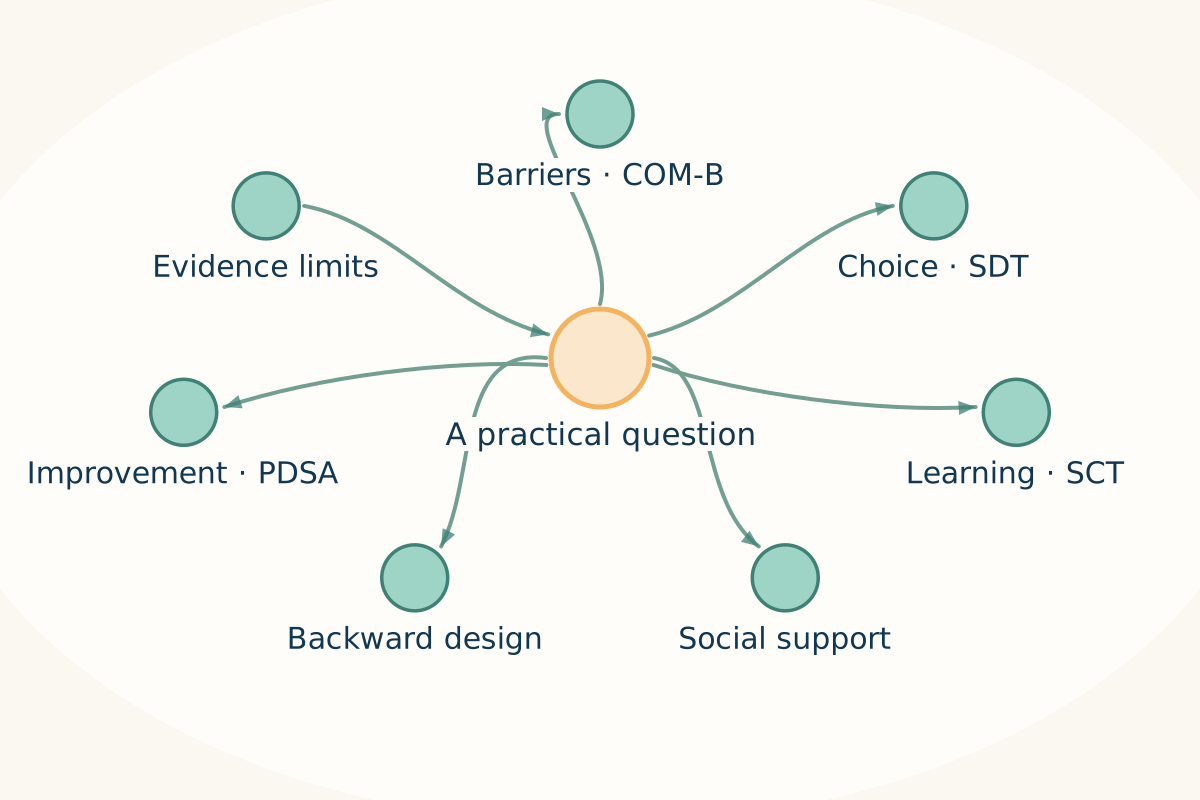
**Figure 2. Different models help us ask better questions** · Connection map
Connection map reproduced from carePhysics 3.7, Reference R2. Each model offers a lens for a practical question; none describes the whole person.
1. COM-B examines capability, opportunity, and motivation. Self-determination theory examines autonomy, competence, and relatedness.
2. Social cognitive theory directs attention to learning through the person, behavior, and environment. Social support asks what someone can rely on.
3. Backward design begins with the intended outcome; Plan–Do–Study–Act supports a small test. Choose a model with its evidence limits in view.
[Joe Gleason · carePhysics 3.7 · Reference R2](https://genusconnect.org/carephysics/book/r2)
## What the models help us notice
COM-B examines capability, opportunity, and motivation in relation to a particular behavior. In a partner discussion, it can help separate a missing resource from a confusing explanation or an unwanted request. Begin with a specific action and circumstance rather than a judgment about the whole person. The original framework is described by [Michie, van Stralen, and West](https://doi.org/10.1186/1748-5908-6-42).
Self-Determination Theory draws attention to autonomy, competence, and relatedness. For an experience designer, those ideas encourage questions about meaningful choice, feeling able to participate, and connection with others. A resource can be easy to click while still leaving someone feeling pressured or alone. Read the theory’s [basic psychological needs overview](https://selfdeterminationtheory.org/topics/application-basic-psychological-needs/).
Social-support ideas ask what someone can actually rely on. Social Cognitive Theory helps teams consider examples, practice, and the interplay between a person and their environment. Communication methods such as motivational interviewing and teach-back support different kinds of conversation. They are not interchangeable labels for being friendly, and using a phrase from a method is not the same as delivering the full approach.
The carePhysics reference companion, [The Models Behind carePhysics — Ideas We Can Put to Work](https://genusconnect.org/carephysics/book/r2), provides fuller explanations and references. A partner does not need to put every model into every pathway. Choose the question first, then the model or method that can help examine it.
## Turn understanding into an experience
Suppose the team learns that Maya wants to prepare but cannot identify which part of the form applies to her. A useful response might be a shorter explanation, a relevant example, and a way to ask a person for help. The team can then check whether its explanation worked. Another reminder to the unchanged form would not address the problem it has discovered.
This is how evidence can influence features. The model suggests a question; the conversation supplies context; the team changes an interaction; people try it; and the team reviews what happened. The feature might be a branching question, a different content format, a clearer handoff, or a choice to speak with someone. The important connection is between the need and the response.
Keep the distinction between a design rationale and a demonstrated outcome. An approach can be informed by research without having been evaluated in your setting. A local trial can produce useful learning without proving that the same result will occur elsewhere. Describe the audience, circumstances, and limitations alongside the result when sharing it.
## Where AI helps
AI can help prepare several versions of an invitation or organize a design brief around a selected model. Give it approved information, the intended audience, the desired next step, and the boundaries of its task. Ask it to identify assumptions that a person should check. The draft then becomes material for a conversation, not a decision already made.
Review whether the output actually supports the chosen purpose. A draft that names autonomy but offers no meaningful choice has not solved the design problem. A draft that offers help unavailable in the program creates another problem. Frontline staff and participants can often identify those gaps quickly when they see the proposed experience in context.
Human reviewers remain responsible for the meaning, evidence, and use of the result. Avoid asking an assistant to infer a person’s motivation, capacity, or emotional state from a single response. A missing answer may tell you that the interaction needs attention; it does not tell you the person’s story.
## Bring your knowledge
Choose an interaction your team finds frustrating. Describe what you want the person to do, why it would help them, and what the interaction asks of them. Then ask what you actually know about the barrier. Separate observed facts from explanations you have assumed. Invite someone who receives the interaction to help you reconsider it.
### Explore further — Evidence-informed does not mean guaranteed
A model helps organize thinking. A communication method helps guide a practice. An improvement method helps a team test a change. A study can provide evidence about a defined intervention, population, and outcome. These contributions are valuable for different reasons. Treating them as identical makes it harder to know what a design is relying on.
In this guide, carePhysics connections explain why a feature or interaction may be worth considering. They are not claims of endorsement by the model’s authors, certification by a research organization, or proof of clinical benefit from genus. Keep the source attached to the idea and keep learning from the people who use it.
---
# 3. Your purpose shapes the experience
*Your knowledge gives shared capabilities their local meaning.*
## The same feature can serve a different purpose
Two organizations can use a video, a question, and a follow-up message to create very different experiences. A home-care team may help a family prepare for a first visit. A community center may introduce an activity and the person who will welcome newcomers. The technical pieces are similar. The knowledge, relationship, and purpose around them are different.
That difference is central to genus. A partner brings more than a logo. It brings experience with its audience, the language people recognize, trusted resources, service boundaries, and an understanding of what happens on a difficult day. Those contributions shape how capabilities are configured and what the resulting experience asks people to do.
An organization’s mission becomes useful when it influences decisions. If the mission includes helping people retain independence, an invitation should offer understandable choices. If it values belonging, the experience should connect people with a welcome they can actually find. If it promises responsive support, the team needs an operational way to receive and answer questions.
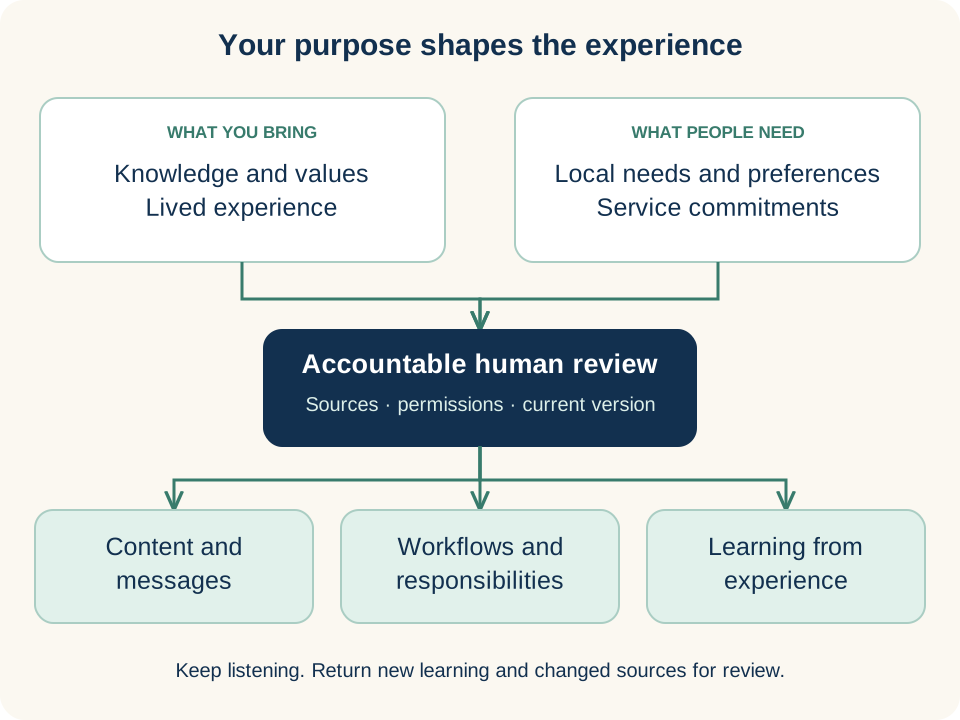
**Figure 3. Your knowledge gives capabilities their local meaning** · Connection map
Connection map adapted for this field guide from the carePhysics idea of shared knowledge with local judgment. A partner’s purpose shapes how each capability is used.
1. Bring approved knowledge together with lived experience, values, and the needs people describe.
2. Accountable people review sources, permissions, and current versions before local use.
3. Content, workflows, and learning carry that purpose into everyday interactions. New learning returns for review.
[Joe Gleason · carePhysics 3.7 · chapter 13, adapted](https://genusconnect.org/carephysics/book/chapter-13)
## Bring knowledge into the work
A useful partner knowledge base brings approved research, care strategies, explanations, and communication guidance together with local resources and questions. Central owners maintain shared standards; departments and locations contribute relevant knowledge. Review keeps contacts, service conditions, and guidance current.
Knowledge may also be practical and difficult to capture in a policy document. A frontline worker knows which part of an introduction causes uncertainty. A volunteer has found a respectful way to begin a conversation. A participant notices that a message assumes access to a car. Those observations deserve a route into improvement, with permission and context preserved.
The platform can help organize and deliver knowledge, but a partner must decide which material is appropriate for which audience. Staff guidance, public information, and family resources may overlap without being identical. A public explanation should not expose internal case notes. An AI assistant needs the same clarity about what it may use and for whom.
## Three kinds of governance
Personal governance begins with the person’s choices and the authority appropriate to their circumstances. Who do they want involved? What do they understand about an invitation? How can they correct information or ask for a different arrangement? Where a representative has an authorized role, the scope of that role needs to be clear rather than assumed from a family relationship.
Organizational governance assigns responsibility for operating the experience. Who approves content? Who reviews a pathway? Who manages access? What happens when a message describes a need outside the service’s scope? The answers should be specific enough that a staff member can act on them during normal work.
Mission stewardship concerns the longer direction of the ecosystem. We want the mission to remain clear as genus grows: people and families first. genusCommunity Foundation’s stewardship role belongs in that conversation.
Read the [genusCommunity Foundation section](https://genusconnect.org/companies#genuscommunity-foundation) alongside the relevant partnership discussion. Before you commit, agree what stewardship means in practice: who is responsible, how participation works, and what happens if the arrangement changes.
## The carePhysics connection
[Shared Tools, Local Wisdom](https://genusconnect.org/carephysics/book/chapter-13) gives this chapter its practical foundation. Shared tools become more useful when they carry local knowledge without erasing the judgment and relationships that made that knowledge valuable. [Bring Human Wisdom Within Reach](https://genusconnect.org/carephysics/book/chapter-09) extends the question to AI assistance.
A partner’s values should appear in the behavior of an experience. A respectful tone matters, but so do the choices offered, the permissions applied, and the response when someone says the arrangement does not work. The person’s experience is where the organization’s stated values become visible.
## Where AI helps
An assistant can help organize approved material, identify conflicting explanations, and draft content for a defined audience. A reviewer can use it to compare a proposed message with the organization’s language and purpose. The team still decides which sources are authoritative, which are current, and which should be available in that context.
A broad collection of documents is not automatically a governed knowledge base. It may contain outdated material, different audiences, or unresolved disagreements. Before giving AI access, clarify the collection’s purpose and limits. Better organization improves the conditions for useful assistance; it does not remove the need to check the output.
## Bring your knowledge
Gather one approved resource, one frequently asked question, and one frontline observation. Discuss what each contributes to a specific interaction. Decide who should review it and how the team will know when it needs updating. This small exercise often reveals more about a workable knowledge process than a plan to upload every document at once.
### Explore further — A practical knowledge record
For a resource your team wants to reuse, record its audience, owner, source, review date, intended use, and important limitations. Include the contact or process for correcting it. If it contains another person’s experience, decide what permission is needed before sharing and what details should remain private.
These are operating choices a partner should establish, not a claim that every field is implemented identically in every genus module. The purpose is to keep a useful idea connected to the conditions that make it trustworthy. That connection matters whether a human colleague or an AI assistant helps bring the idea forward.
---
# 4. One ecosystem, many configurations
*A useful configuration begins with an outcome people recognize.*
## Choose the work before choosing the modules
A community organization asks for an app. Its real challenge is the beginning: people express interest but do not reach their first visit. Some need transport; others are unsure whether they will feel welcome. The organization needs to connect an invitation with useful support.
An initial configuration could combine public resources, a staff introduction, a way to ask questions, and a preparation pathway. The portal supports the team’s content and follow-through; the care app supports an ongoing community. Each part serves the same outcome.
genus is a modular ecosystem. Connected capabilities support publishing, pathways, communities, communication, and engagement review. Configuration determines who uses which tools and how they serve the partner’s purpose. Integration or development may be needed for additional requirements.
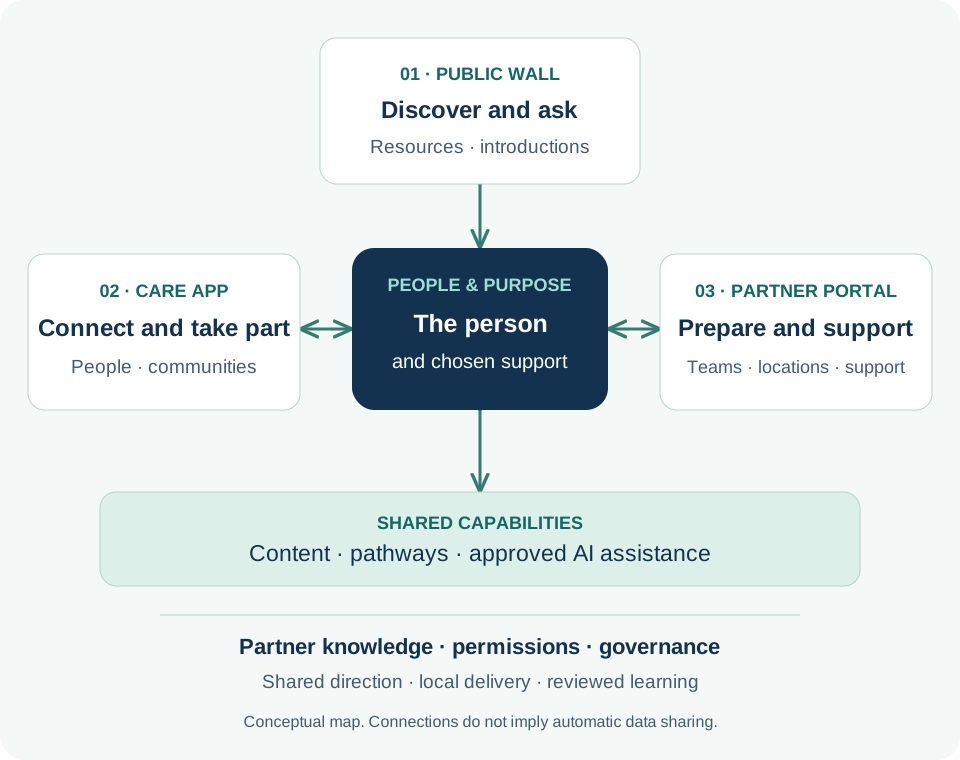
**Figure 4. People and purpose connect the ecosystem** · Connection map
Conceptual configuration map. Connections represent intended relationships, not automatic data sharing or a promise that every module is enabled.
1. The public wall offers a place to discover resources and ask about a service.
2. The care app supports several distinct communities around people and purposes, each with its own context and access.
3. The portal supports personal actions and selected bulk work across communities. Central knowledge and governance guide local delivery; reporting coverage and learning responsibilities are agreed.
## The main surfaces
The **public wall** offers resources through a partner’s website or a dedicated experience, including for people still deciding whether to engage. Public information remains separate from private care information.
The **care app** connects a person, invited supporters, and relevant resources. Someone can participate in several communities with different roles, resources, and access in each. The current community gives a personal interaction its context.
The **partner portal** coordinates communities, content, pathways, campaigns, training, and engagement review. It supports individual work and selected bulk operations so staff can respond personally without rebuilding every resource or repeating every administrative step.
Shared content, communication, AI assistance, permissions, and learning connect these surfaces. A clinical record, a community conversation, and a public article retain their own purposes and access conditions.
## One organizational foundation, many local communities
The intended operating model reaches from a central organization through its departments, locations, and configured programs or subsystems to the communities they serve. Central teams establish approved knowledge, research, care strategies, brand standards, governance, and measurement definitions. Local teams contribute their contacts, resources, language, and understanding of the people involved.
This supports **consistent direction with local relevance**. A shared welcome pathway can provide a starting point for several locations, while each team checks its contact details, service arrangements, and audience. Feedback and reviewed improvements return to the shared knowledge so other teams can learn. Configuration determines organizational scope, permissions, distribution routes, and available reporting; the [portal chapter](#chapter-09) explains the practical work.
## A configuration map
The figure places the person and chosen support at the center of the public wall, care app, and portal. Knowledge and governance shape the shared capabilities underneath. Its arrows express intended relationships; access remains governed.
An introductory program might start with public resources and a staff-managed pathway. A family service may add invited supporters; another program may serve the participant directly. Choose the arrangement that fits the relationship the team can maintain.
Configuration includes ownership: who reviews resources, answers questions, explains notifications, and manages transitions when someone leaves. Those decisions make the experience dependable.
## The carePhysics connection
[Technology — Make Help Easier to Reach](https://genusconnect.org/carephysics/book/chapter-08) asks us to consider the effort an experience requires. [Shared Tools, Local Wisdom](https://genusconnect.org/carephysics/book/chapter-13) explains why common tools still need local understanding. Together, they encourage partners to select a manageable arrangement and fill it with knowledge that matters to their audience.
For the community organization, “feel prepared to try one visit” helps the team choose resources, transport steps, and introductions—and gives it an outcome to review.
## Where AI helps
An assistant can draft a configuration brief covering audience, desired experience, resources, and next steps. It can flag gaps such as an invitation that mentions transport without explaining how to arrange it. People review the proposal.
Service capacity, integrations, permissions, clinical boundaries, and operational responsibilities require explicit decisions. AI helps make those decisions visible; the responsible team makes them.
## Bring your knowledge
Describe one experience before naming its modules. Who needs what? Which team can follow through? What should be shared across locations, and what needs local adaptation? Connect each responsibility with the appropriate surface.
Start with an experience the team can maintain. Extend it when learning shows a useful reason and someone can own the work.
### Explore further — Configuration and custom development
Configuration uses supported platform choices. Custom development adds or changes behavior. Integration connects systems through an agreed interface and data arrangement. Each has different responsibilities.
Agree which needs fit existing capabilities, which require adaptation, and which need new work. Decide how updates will be tested and supported while preserving a maintainable shared platform.
---
# 5. A care community that can travel with the person
*A change in service should not erase the relationships that matter.*
## Life continues across organizational boundaries
Maya’s hospital stay ends, but her life does not begin again at the door of the next service. Lena is still her sister. The neighbor still knows which groceries she likes. A community connection may become more important as professional visits become less frequent. The people and purposes around her continue even when the organizations involved change.
The care app already lets people join more than one care community and switch between them. Our aim is to help relationships continue as services change. Each partner still needs to agree what continues, who remains involved, and how access changes.
Continuity of relationships is not the same as automatic access to every organization’s records. A hospital document, a home-care record, a shared resource, and a family conversation may have different owners, retention requirements, and access conditions. The book’s continuity principle should guide the partnership discussion without promising that those boundaries disappear.
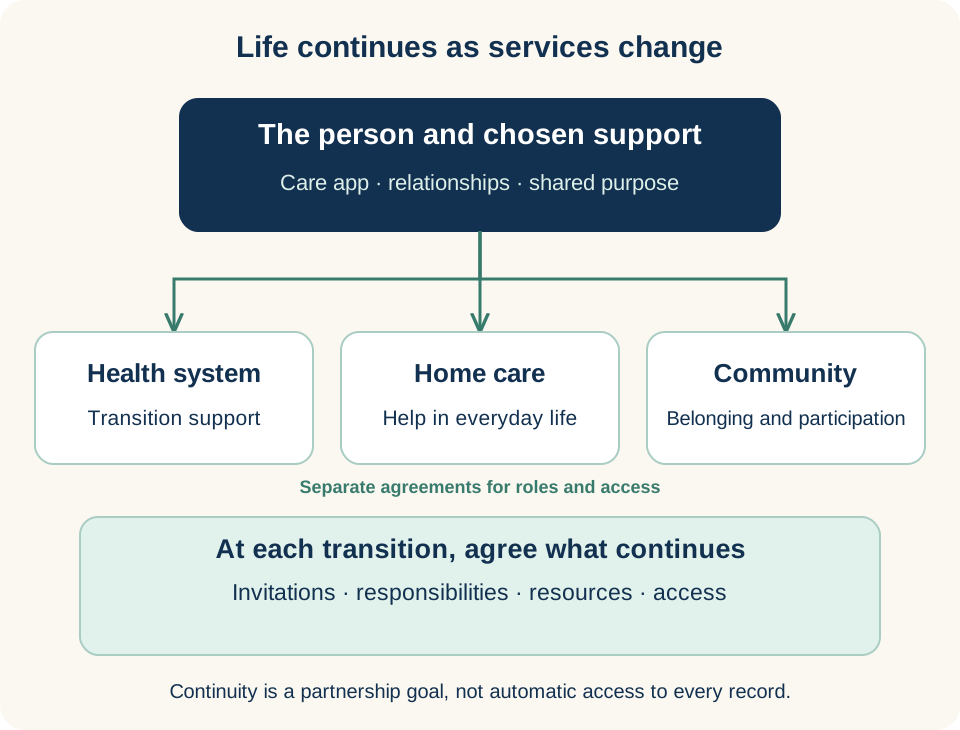
**Figure 5. Keep relationships in view through a transition** · Connection map
Conceptual continuity map. Relationships may continue as services change, while organizations retain distinct responsibilities and access boundaries.
1. Ask which people, relationships, and resources the person wants to continue.
2. Each partner agrees its role, what information is appropriate, and how access changes.
3. Continuity is a partnership goal. This diagram does not promise automatic record sharing or unchanged access after every transition.
## Invitations are the beginning of an agreement
The care app supports community memberships and invitation flows. An invitation gives someone a route to join the appropriate context; it should also help them understand why they are being invited and what role they are expected to have. The available roles and invitation authority depend on the configuration and the person’s circumstances.
An invitation to help with an activity should not quietly become a general assignment to manage care. A family relationship does not establish unlimited access. A supporter may be willing to receive a particular update while being unable to take on another responsibility. Clear language makes it easier to discuss these differences before frustration develops.
For Maya, the useful question is not simply whom she knows. It is whom she wants involved in a particular part of her support. Lena may help prepare questions for a visit. The neighbor may help with groceries. A professional may need information that neither supporter needs. Design the arrangement around those purposes and review it when the situation changes.
## Participation without a family requirement
A partner can consider a direct participant experience, a family-inclusive community, or a combination suited to the service. The appropriate configuration depends on the audience, permissions, and operating model. The person should not be treated as an incomplete participant because they have no family member to invite or prefer not to involve one.
Where representatives or guardians have an authorized role, the partner must establish how that authority applies. Where a person can direct their own participation, design choices should support their understanding and agency. Avoid using a single family label to cover different legal, practical, and personal relationships.
The everyday experience also matters. Some people want frequent updates. Others need a quieter rhythm or a different way to receive information. A supporter may be comfortable with an app but need a clear human contact for questions. Configuration should begin with those preferences and the channels the partner can actually support.
## Plan the transition before it arrives
At the beginning of a service, explain what participation means and what may change at the end. Review account access, organizational roles, shared resources, ongoing community involvement, and the process for questions. Where another partner will become involved, agree the handoff rather than assuming a shared platform makes it complete.
A practical transition conversation asks what the person wants to continue, which organization is responsible for the next step, and which information can appropriately accompany it. The team should also explain what will not continue. An honest boundary helps people plan; an unexplained loss of access can undermine trust even when it follows the contract.
## The carePhysics connection
[Make Belonging Practical](https://genusconnect.org/carephysics/book/chapter-05) and [Build a Community That Can Follow Through](https://genusconnect.org/carephysics/book/chapter-12) connect the idea of continuity with actual support. A community is useful when people understand their roles, can communicate limits, and know how to respond when an arrangement changes.
For a partner, this means looking beyond successful enrollment. Ask whether people can find help during a transition, whether commitments have receiving owners, and whether a supporter can revise an agreement without feeling judged. Those are important parts of a continuing relationship.
## Where AI helps
AI can help a team draft a transition checklist, simplify an approved explanation, or prepare questions for a person and their supporters. A summary may help authorized staff review a situation, provided its sources and limitations remain visible and a person checks it.
AI should not decide that information can cross an organizational boundary, expand a family member’s permissions, or infer agreement from participation. People and accountable organizations establish those conditions. The assistant can support a clearer discussion of them.
## Bring your knowledge
Map one real transition in your service, using no identifying details in an open workshop. Identify the relationships that should continue, the access that changes, and the responsibility for explaining that change. Ask a participant or supporter what they would need to understand before feeling comfortable with the arrangement.
### Explore further — Questions for a continuity agreement
Ask which membership and account arrangements apply after the service ends, how a new partner is introduced, how invitations and permissions are reviewed, and how someone can obtain help with access. Discuss records and export arrangements separately from the social experience of remaining connected. Confirm the answers in the applicable implementation and partnership terms before presenting continuity as a service promise.
---
# 6. Many circles, different roles
*The same person can need support in one place and offer it in another.*
## A person is more than one role
Lena helps her sister Maya prepare for a return home. She also checks in with her own father and volunteers with a neighborhood reading group. In one circle, she is coordinating practical support. In another, she is a daughter learning what her father wants. In a third, she has something to give. These fictional situations illustrate a familiar reality: people do not organize their lives around a single service or label.
The care app includes community membership and switching, so someone can participate in more than one community. That structure matters because each community has a different purpose. The people, information, and responsibilities appropriate to one circle may not belong in another. A useful experience makes the current community clear before someone reads, responds, or shares.
For a partner, this changes the design question. Instead of asking how to keep everyone inside one program, ask how the program can become a helpful part of a person’s wider life. The relationship may be important without needing to become the center of everything.
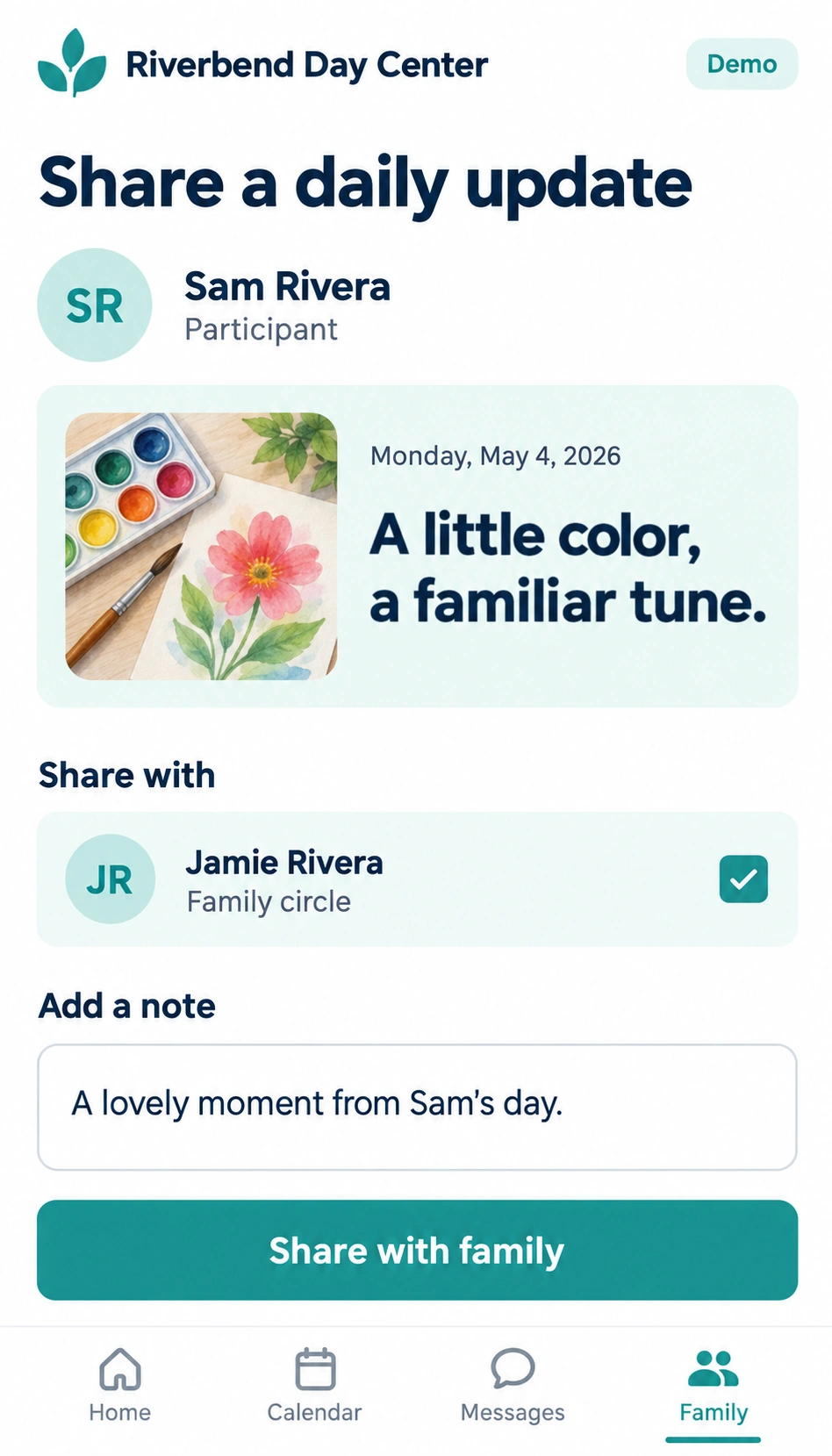
**Figure 6. Make the sharing context visible** · Demonstration screen
Existing public demonstration screen using fictional names and information. It illustrates an interaction to discuss, not a customer record or a guarantee of every deployment’s interface.
1. The update identifies whose day is being shared and gives the moment a human context.
2. The named recipient makes the intended audience visible before sharing.
3. The note and final action create a moment to review what is being contributed.
## Participation should be understandable
A person joining a community needs to know what it is for, who is there, what can be shared, and what participation is expected. A family member may be comfortable offering transport but unable to coordinate appointments. A volunteer may want to contribute to a public activity without entering a private care circle. A participant may prefer direct contact with staff and choose not to invite relatives.
Those differences should influence the arrangement. Invitation and membership tools support joining communities, while the partner’s roles and permissions define the available access. An invitation is an opportunity to explain the relationship. It should not quietly become agreement to every future use of information.
Public groups need a similarly clear purpose. If your program intends to offer publicly discoverable groups, confirm the supported participation and moderation arrangements separately from private care communities. Discoverability, membership, and permission to see someone’s personal information are different questions.
The app’s community structure provides a foundation for these experiences. The partner still needs to decide which kinds of groups it will support, who will welcome new members, and how concerns will be handled. A visible group with nobody responsible for it can leave people less confident than an honest invitation to a smaller, well-supported circle.
## Give without turning care into a contest
A community may benefit from knowing that someone has checked in, shared a useful resource, or offered a ride. That visibility can help people avoid duplicated work and notice an unmet need. It can also become uncomfortable if the experience appears to rank who has done the most.
The useful question is what the group needs to coordinate. A count of calls may say little about the effort involved, the quality of a conversation, or the support happening elsewhere. Some people contribute quietly. Some carry responsibilities the app cannot see. Design should leave room for that reality.
Partners can help by choosing language and measures that encourage support rather than competition. Ask whether a display helps the person receiving care, whether it respects the people contributing, and whether participants can explain what the display misses. Feedback from families and frontline teams belongs in those decisions.
## The carePhysics connection
[Community — Make Belonging Practical](https://genusconnect.org/carephysics/book/chapter-05) and [Support the People Who Care](https://genusconnect.org/carephysics/book/chapter-11) help connect participation with belonging and capacity. A community becomes useful through the relationships it supports, not simply through its membership count.
Social-support thinking also encourages a broader view of contribution. Practical help, information, encouragement, and companionship are different forms of support. A partner can make several forms possible without expecting every person to provide all of them.
## Where AI helps
AI assistance can help a team draft a welcoming explanation, suggest clearer participation instructions, or prepare different versions of a resource for review. An assistant working within an authorized context may also help organize questions that a human coordinator needs to address.
Community boundaries still apply. Information available in one context should not become material for another simply because an assistant can summarize it. The system and the people operating it need to preserve the relevant access, purpose, and sharing conditions.
## Bring your knowledge
Map the roles your audience already holds outside your organization. Then choose one place where your program could make those relationships easier: a clearer invitation, a resource that supporters can understand, or a way to identify who can help with a specific task.
Ask participants what they want others to know and what they would prefer to keep separate. Test the language with people who have different family structures and levels of available support. The aim is an experience in which people recognize themselves, including when their capacity changes.
### Explore further — A community check-in
Before opening a new circle, agree on its purpose, who may invite people, who can see each kind of information, and who will respond when something needs attention. Explain how a member can ask for a change or leave. Revisit those choices when the purpose or membership changes. This is ordinary relationship work supported by technology, and it deserves a place in the ongoing service rather than only in the setup process.
---
# 7. An open door: the public wall
*Help can begin before someone is ready to join.*
## The first visit is already an interaction
A daughter finds a community program while looking for something her father might enjoy. She does not yet know whether the program fits, whether transport is available, or whether asking a question will lead to a sales call. She is looking for a useful beginning.
A public wall can bring resources and invitations into an experience that does not begin with joining a private care community. Partners can present public content through supported website embeds or a dedicated landing experience. The opening should help someone understand what is available and what they can do next.
This is a practical place for a partner’s knowledge to become visible. Local language, familiar questions, clear descriptions, and relevant examples can turn a generic resource into something a visitor recognizes. The first useful interaction may be reading a short answer, watching an introduction, or learning whom to contact.
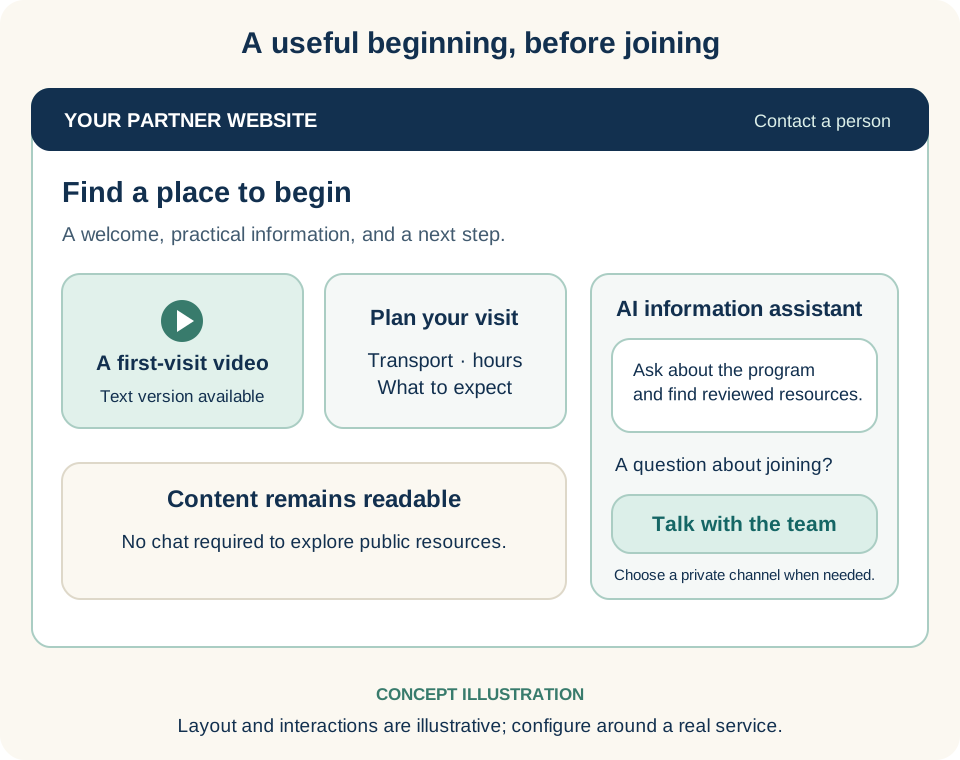
**Figure 7. Offer a useful first step** · Concept illustration
Concept illustration, not a product screenshot. It shows how a partner could arrange public resources, an optional AI conversation, and a clear route to a person.
1. Begin with a specific audience and a question the service can help answer.
2. Keep essential information readable without chat and provide text alongside video.
3. Identify AI clearly, use reviewed resources, and offer a human contact route. A private need may require a different channel.
## Give each landing experience a purpose
A landing page should make a manageable promise. It might help someone prepare for a first visit, understand a service, explore a topic, or begin a conversation. Trying to serve every audience and answer every question at once makes that promise harder to see.
The public wall’s content and embed options support experiences that can sit within a partner’s existing website. The surrounding page still matters: the heading, context, accessibility, contact route, and explanation of what happens after a response. An embedded experience should feel like part of the relationship the organization is offering.
For the community program, an initial arrangement might include a brief welcome, a video showing a typical activity, a practical transport explanation, and an invitation to ask about a first visit. Each item earns its place by helping the visitor decide. The team should be prepared for the questions that invitation creates.
## Conversation can help people find a way in
The public wall includes chat experiences that can be embedded alongside content. When configured with approved resources and an appropriate remit, an assistant can help visitors explore information in their own words. Someone who does not know the name of a service may be able to describe what they are trying to do.
The experience should explain that the person is interacting with AI and make a human contact route easy to find. It should also make the scope clear. A program information assistant can help someone find opening hours or understand an activity. That does not make it the right place to assess an urgent health concern or provide individualized clinical advice.
Public conversation also calls for thoughtful prompts. Do not encourage visitors to disclose personal details that the experience does not need. Explain the relevant privacy arrangements and direct people to an appropriate channel when their question requires a private conversation. A warm invitation can still have clear boundaries.
## The carePhysics connection
[Awareness — Make Understanding Possible](https://genusconnect.org/carephysics/book/chapter-02) and [Communications — Help People Feel Heard](https://genusconnect.org/carephysics/book/chapter-04) offer useful starting points. The first task is often to help a visitor recognize that the resource is relevant and understandable.
Choice matters here. A person may want a short explanation, a video, or a conversation. Those options should lead toward the same useful understanding, with important information available in accessible text. A video should not be the only way to learn a practical requirement.
## Where AI helps
Before release, AI can help editors identify unanswered questions, draft plain-language introductions, or propose variations for different audiences. During use, a configured assistant may help people navigate reviewed information. Afterward, appropriately handled feedback can help the team see which explanations need improvement.
The partner supplies the current service knowledge and decides what the assistant may do. When the source information is incomplete or a request falls outside that scope, the useful response is a clear route to help. Fluency alone is not a reason to trust an answer.
## Bring your knowledge
Choose one audience and one question they often bring to your organization. Build a small public experience around that question. Include a next step someone can actually take and identify the person or team responsible for it.
Review the experience on a phone, with a keyboard, and with someone who has never heard your internal terminology. Ask them what they think will happen if they respond. Their expectation is part of the design. If it differs from the service you can provide, change the invitation before expanding its reach.
### Explore further — Public does not mean private care access
A public resource, a question asked before signing in, a contact request, and a private community conversation are different interactions. Moving between them may require a clearer explanation, additional identity checks, or a different channel. Agree on those handoffs during configuration. Keep essential public information readable without requiring someone to start a chat, and provide a useful alternative when an embed or assistant is unavailable.
---
# 8. Content people can do something with
*A resource becomes useful when someone can connect it with their own next step.*
## From a library to a helpful moment
A home-care team has a thoughtful video about preparing for a first visit. The video answers many questions, but people still call with the same uncertainties. Some never see it. Others watch it without knowing which parts apply to them. A few need a written version they can share with a supporter.
The problem may be the arrangement around the content. A resource needs a relevant introduction, a manageable format, and a useful next step. It may also need a place for someone to say, “That does not fit my situation.” Those are design choices a partner can make.
genus supports content and media within broader experiences. Articles and videos can be presented with interactive elements and connected to pathways or conversations. The content delivery system gives partners ways to arrange material for an audience; the partner’s knowledge gives that material purpose and meaning.
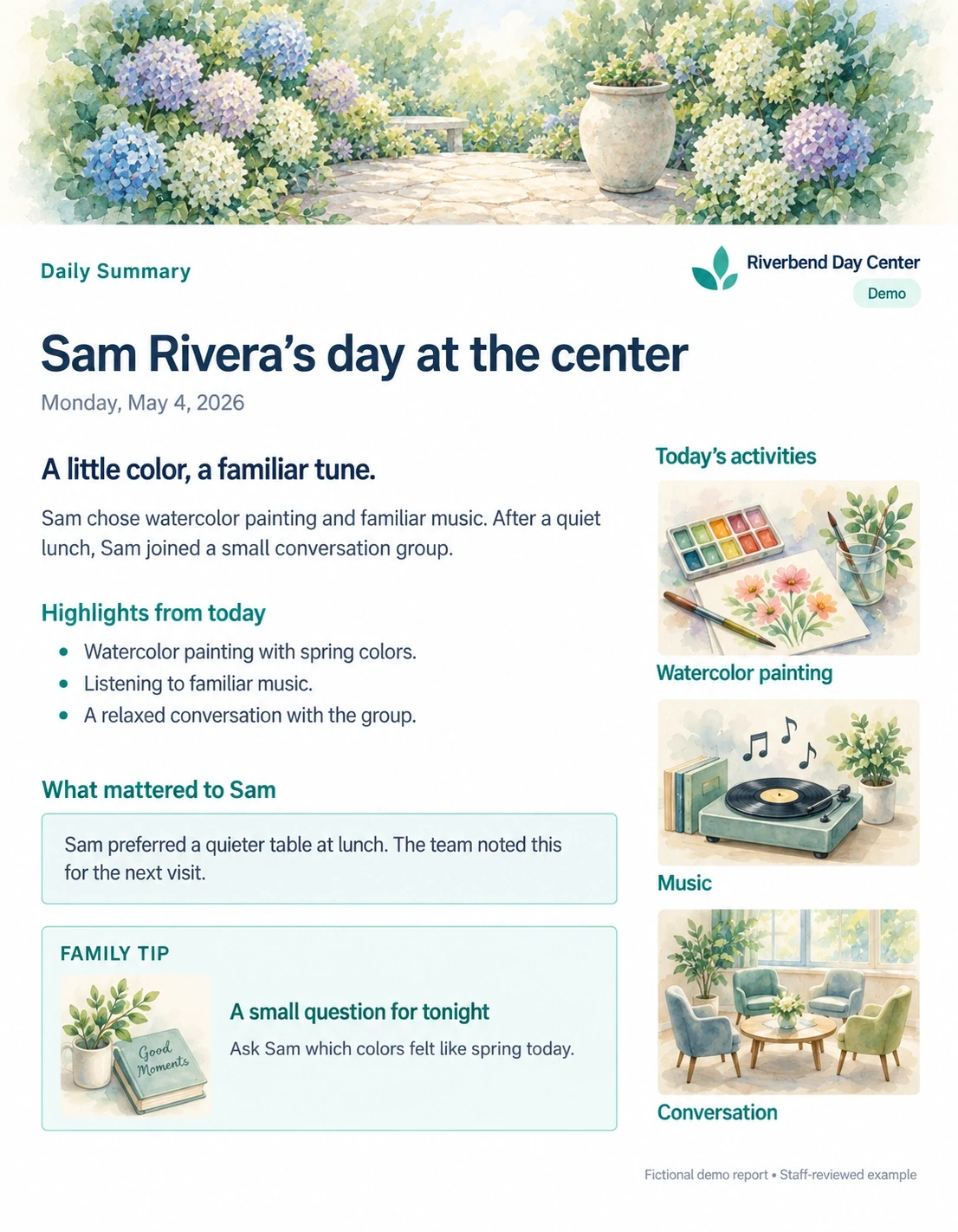
**Figure 8. Let content begin a useful conversation** · Demonstration screen
Existing fictional demonstration, labeled as a staff-reviewed example. The screen shows one possible communication pattern, not an automatically generated clinical record.
1. Highlights give a supporter something specific to ask about.
2. What mattered to Sam preserves a preference the team can consider next time.
3. The family tip offers a small next conversation connected to the day.
## Design a small, complete interaction
Consider a short preparation resource. It could explain what a first visit involves, show a brief video, ask which part the person wants to discuss, and provide a clear contact route. The interaction is complete when the person understands something useful and knows what happens next.
Interactive elements should help that understanding. A reflection, choice, or question can invite participation. It can also become unnecessary work if the organization asks for information without using it. Explain why a response matters and show what the person can expect in return.
The system can bring different content objects together, but the team should choose each object for a reason. An article may provide detail. A short video may make an unfamiliar experience easier to imagine. An interactive question may reveal a concern. A conversation may be needed when the answer depends on someone’s circumstances.
## Match with care
Matching a resource to an audience means considering relevance, timing, language, format, and the intended action. It also means deciding what information is appropriate to use for that match. Partners should be able to explain why a resource appears without relying on assumptions that the person cannot see or correct.
Start with clear, reviewable choices. A person has asked about transport. A team has invited participants to prepare for an activity. A pathway has reached a step where a particular explanation is useful. These are understandable reasons to offer content. More complex personalization needs its own evaluation and governance.
Keep room for people to choose another route. Someone may prefer a shorter explanation, already know the material, or need support beyond what the resource covers. Completion should not become the only acceptable response.
## The carePhysics connection
[Engagements — Make Each Interaction Worthwhile](https://genusconnect.org/carephysics/book/chapter-06) helps connect content with value for the person receiving it. The reference companion also discusses [ARCS](https://genusconnect.org/carephysics/book/r2#r2--p05276), a model that considers attention, relevance, confidence, and satisfaction in learning design.
Those ideas can guide questions without turning every resource into a lesson. Does the opening make the purpose clear? Does the example feel relevant? Can the person try a manageable next step? Is there a useful response when they participate? The answers matter more than adding another media format.
## Where AI helps
AI can assist with drafting, organizing, and adapting content for review. It may propose a shorter explanation, extract questions from approved material, or help connect a resource with an audience’s stated needs. A team can use these drafts to keep a conversation moving while it develops the final experience.
Review should cover accuracy, tone, permissions, accessibility, and the limits of the resource. Clinical material needs the appropriate clinical review. Translation or reading-level adaptation should preserve meaning rather than simply sound fluent. Approved source material and a responsible editor remain central to the work.
## Bring your knowledge
Choose a resource people already ask for. Write down the moment when it is useful, the question it answers, and the next step it supports. Then test the smallest interaction that can accomplish that purpose.
Watch for the point where a person hesitates or asks for something the resource does not provide. That moment may suggest a better explanation, a different format, or a human handoff. Record the lesson with enough context that another team can understand why the change helped.
### Explore further — Keep content maintainable
Every published resource needs an owner and a way to be reviewed or retired. Record its audience, source, approval status, intended use, and review date. Note any limits on reuse. When a service changes, update the resource and the pathways that depend on it. A useful content library is a maintained body of knowledge, supported by a process that helps people notice when something no longer fits.
---
# 9. The portal behind the experience
*A calm experience for participants depends on clear work behind the scenes.*
**Industry perspective**
> “The most important thing is to develop a relationship with a patient.” [*](#quotation-context)
Dr. Peter-Marc Fortune, paediatric intensive care physician and chief medical information officer at Manchester University NHS Foundation Trust at publication
[How Microsoft Dragon Copilot is helping UK clinicians focus on care · Microsoft UK Stories](https://ukstories.microsoft.com/features/how-microsoft-dragon-copilot-is-helping-uk-clinicians-focus-on-care/) · September 4, 2025
Speaking about clinical AI and face-to-face care in a Microsoft article about Dragon Copilot. This perspective concerns a different product.
## Give the team a place to work together
A coordinator wants each participant to receive a clear introduction, relevant resources, and a reliable response. Several teams and locations may contribute. They need shared preparation and a practical way to act for the right community.
The partner portal connects content, communities, pathways, campaigns, training, and engagement review. **Prepare shared support centrally; make it useful personally.** Individual and bulk workflows help teams move quickly, with tools and access defined by configuration and role.
A coordinator, editor, trainer, and organizational leader need different views of the work. Each should understand what needs attention and who can act.
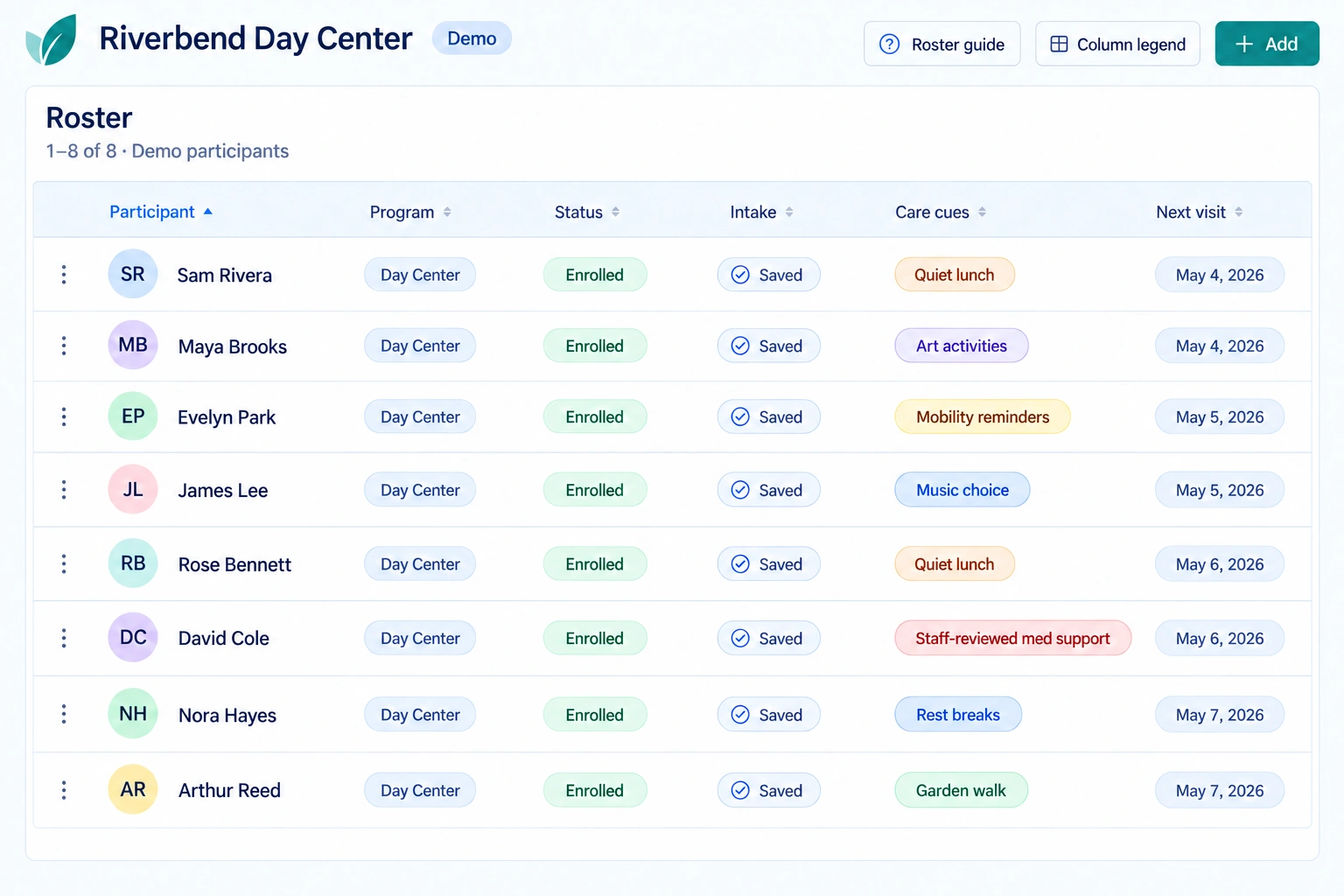
**Figure 9. Help a team see the people behind the work** · Demonstration screen
Existing public demonstration screen with fictional participants. Its annotations are reading prompts for partners, not claims about a particular operational installation.
1. Program and status columns organize the team’s work around named participants.
2. Care cues bring practical context into view: a quiet lunch, an activity, or a rest break.
3. The next-visit column connects the view with preparation and follow-through.
## One community or many
A staff member can place a phone-book contact in one community or several selected communities. Supported bulk workflows can place several contacts across that selection. The team can also make selected pathways available to selected communities. A shared starting point saves repeated setup while each community keeps its own context.
For example, a coordinator could make an approved welcome pathway and the correct local contact available to families joining a program. Staff check the audience and content first, then review the results and any failed operations. Personal communication means that people receive something relevant and know whom to reach; selecting more recipients is only an administrative step.
## Onboarding without repeating every step
Onboarding can begin with an individual record or a reviewed upload. Contact import supports reviewing entries before saving selected items. The participant import workflow supports preview, validation, duplicate review, and applying eligible rows in a batch. Exceptions need individual attention; the team checks completed and incomplete operations.
Setup then connects with the service: confirm the right department or location, community membership, invitations, local contacts, and useful preparation resources. The uploaded records are a starting point for that work. A welcoming conversation, appropriate access, and a clear next step make the beginning personal.
## Central direction, local delivery
A larger organization can coordinate configured departments, locations, and program work through the portal. Shared organizational settings can carry branding, goals, resource guidance, communication style, and rules. Pathway context can include organizational and departmental goals, onboarding guidance, and what success should look like.
The partner’s broader operating model brings corporate knowledge, research, care strategies, and governance into that foundation. Central owners maintain approved resources and common definitions; local teams adapt delivery to their communities. Agree which content is distributed where, who approves changes, and how local feedback returns for review and reuse.
Leadership can use available partner-scoped reports and agreed measures to oversee the work. For organization-wide KPIs, confirm which departments and locations are included, which data is connected, and whether definitions and periods match. The [KPI framework](#chapter-13-what-organizations-can-learn-across-the-whole-journey) supports that discussion. A single central view must have a defined reporting scope; complete cross-location aggregation is a capability to verify for the configured deployment.
## Begin with responsibilities
Assign decisions before choosing views: editors review resources, coordinators manage next steps, and leaders examine whether support reaches its audience. Give unresolved questions a responsible owner.
Preparing, publishing, and reviewing information require appropriate permissions. Organizational oversight does not grant unrestricted access to private community information.
Plan the staff time and authority needed to respond alongside the technical setup.
## Content, campaigns, and training
Content provides resources; campaigns organize audience invitations and communication; pathways arrange supported steps. Together, they connect shared material with a particular purpose and audience.
Training prepares people to apply their organization’s practices. Progress, policy, and completion tools support that work. Define role expectations and any observation or supervision needed to establish readiness.
Completion records describe completed learning under defined conditions; they do not establish professional licensure or independent certification.
## The carePhysics connection
[Shared Tools, Local Wisdom](https://genusconnect.org/carephysics/book/chapter-13) emphasizes that a common platform becomes useful through local knowledge. [Build a Community That Can Follow Through](https://genusconnect.org/carephysics/book/chapter-12) connects preparation with the responsibilities needed after an invitation is made.
For the coordinator, shared tools make the work visible. Listening and judgment make the response useful.
## Where AI helps
AI can help draft campaigns and pathways using approved material and organizational context, clarify an idea, and highlight gaps for review. This can shorten preparation while preserving local knowledge and human responsibility.
Confirm the permissions, review, and execution boundaries of each enabled action. Drafting a proposal and distributing it are separate responsibilities.
## Bring your knowledge
Rehearse one participant journey and one bulk setup with the team. Check who prepares, approves, follows up, and handles exceptions.
Then review the organizational view: which locations are covered, which measures are comparable, and how a useful local idea returns to the shared knowledge.
### Explore further — Read a dashboard as a prompt
A missing response may reflect timing, accessibility, changed circumstances, or choice. Pair patterns with conversations. Let staff explain what the display misses, and review whether it helps decisions without creating disproportionate reporting work.
---
# 10. From an interaction to a supported pathway
*A next step is useful when someone can take it and knows what follows.*
## Connect the moments
An invitation asks someone to attend a community activity. The person accepts, but still needs to understand the location, arrange transport, and know whom to meet. After the visit, they may want to ask a question or decide whether to return. The invitation is one moment in a larger experience.
A pathway connects preparation, participation, reflection, and follow-through. The portal supports creating, managing, and placing selected pathways into one or multiple selected communities. The partner supplies the purpose, resources, sequence, and responsibilities; the team checks that each community receives an appropriate starting point.
A pathway should make the next step easier to understand. It should also leave room for a person’s circumstances to change. Someone may need a different explanation, a pause, or a conversation instead of another automated prompt.
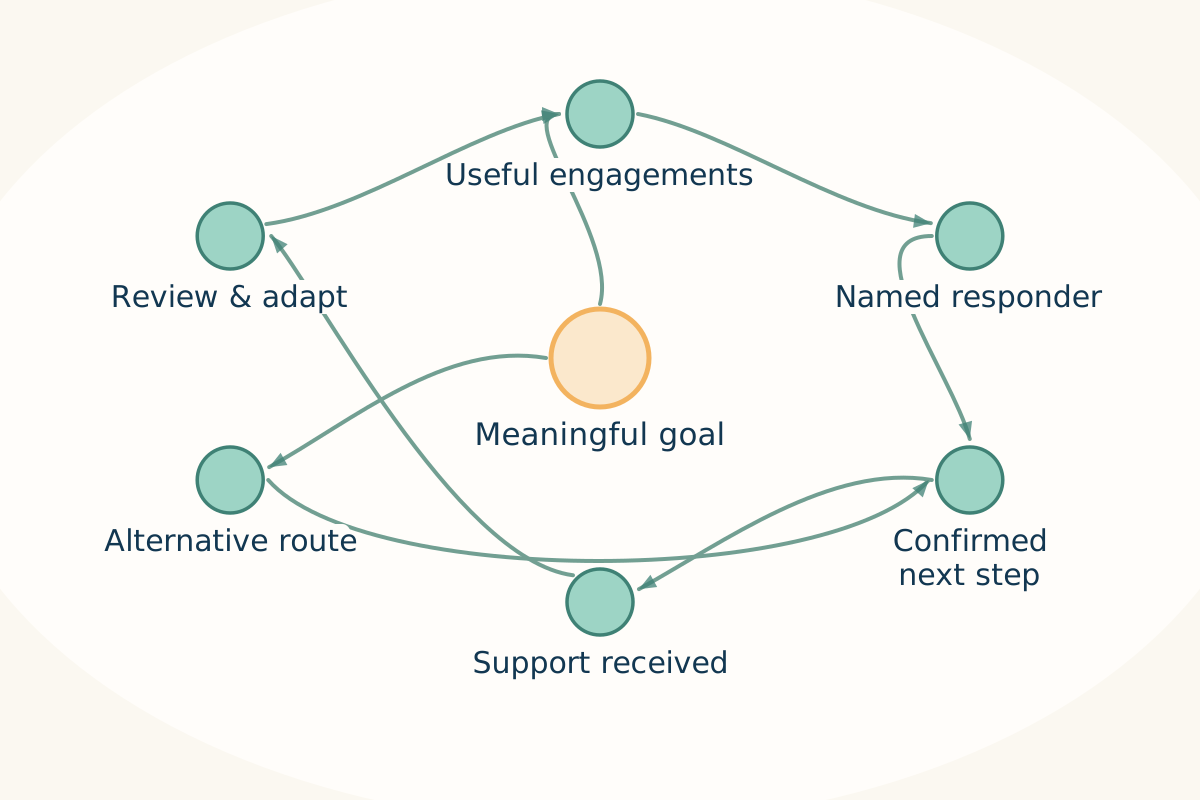
**Figure 10. A pathway needs someone to receive the next step** · Connection map
Connection map reproduced from carePhysics 3.7, chapter 7. The pathway connects interactions with responsibilities and support, including an alternative route.
1. Start with an outcome that matters to the person, then choose useful engagements.
2. A named responder confirms the next step; sending a message alone does not complete a handoff.
3. Review what support was received and adapt the route when the arrangement does not work.
[Joe Gleason · carePhysics 3.7 · chapter 7](https://genusconnect.org/carephysics/book/chapter-07)
## Start with a meaningful outcome
Describe what should become possible for the person. “Feel prepared for a first visit” gives a team a clearer design direction than “complete five screens.” The experience may include several screens, but their value comes from the understanding and support they provide.
Work backward from that outcome. What does someone need to know? What practical support might be required? What can the person choose? Who will help if a step is difficult? A first draft can be simple enough for participants and staff to discuss together.
Campaigns can invite an audience into a pathway. Content can support individual steps. Community participation can provide encouragement or practical help. The combination should remain understandable: people should know why they are receiving something and what responding will do.
## Plan the exceptions as carefully as the usual route
A person who does not respond may need a different approach, or may prefer not to continue. A person who responds with a concern may need a human conversation. A service may have changed since the pathway was written. These are ordinary possibilities that deserve an agreed response.
For each important step, identify what happens if it is missed, declined, or no longer relevant. Decide whether the appropriate response is a pause, an alternative, or a staff review. Avoid treating every absence as a request for another reminder.
The pathway also needs an end. Explain what has been completed, what support remains available, and how someone can return or ask for help. A thoughtful ending respects the person’s time and makes the next relationship clearer.
## The carePhysics connection
[Pathways — Turn Good Intentions into Supported Progress](https://genusconnect.org/carephysics/book/chapter-07) provides the main bridge. [Begin with One Meaningful Pathway](https://genusconnect.org/carephysics/book/chapter-15) offers a practical way to begin without trying to redesign an entire service at once.
[Backward design](https://genusconnect.org/carephysics/book/r2#r2--p05262) starts with the intended result and works toward the experience needed to support it. [COM-B](https://genusconnect.org/carephysics/book/r2#r2--p05142) can then help a team examine whether people have the capability, opportunity, and motivation for a particular step. Used together, these questions help identify when the missing piece is support rather than another message.
## Where AI helps
An assistant can help turn a team’s description into a draft sequence, identify unclear transitions, or suggest questions for participant review. It may help prepare alternate wording and summarize feedback so the next version can be discussed sooner.
The team needs to verify the pathway’s logic, content, access arrangements, and human handoffs. A plausible sequence can still depend on unavailable transport, an unanswered inbox, or a service that does not accept the intended audience. Those are operational facts the partner must bring to the design.
## Bring your knowledge
Choose a pathway with a clear beginning and a manageable ending. Invite the people who deliver it and the people it is intended to support to examine a draft. Ask what feels unnecessary, confusing, missing, or difficult to fit into an ordinary day.
Agree on a small set of proposed measures. Include something about the person’s experience and something about the team’s ability to follow through. Review participation alongside those measures. A high completion rate is useful only in the context of what the pathway was meant to help people achieve.
### Explore further — A pathway rehearsal
Before release, walk through the pathway using fictional situations. Try the usual route, a declined invitation, a missed step, a question the content cannot answer, and a change in service availability. Confirm that each situation leads somewhere understandable. Invite someone outside the design team to try it as well. Their questions often reveal assumptions that a familiar team no longer notices. Record the changes and repeat the rehearsal when the pathway changes substantially.
---
# 11. AI assistance, with people responsible
*The most useful intelligence helps people bring their knowledge forward.*
**Industry perspective**
> “Center AI development on people’s needs, preferences, and goals throughout its lifecycle.” [*](#quotation-context)
National Academy of Medicine · “Engaged” principle
[Health Care Artificial Intelligence Code of Conduct](https://nam.edu/our-work/programs/leadership-consortium/health-care-artificial-intelligence-code-of-conduct/) · Accessed 2026-10-10
A principle in NAM’s AI Code of Conduct framework, presented here as a guide for thinking about responsible design.
## Begin with a task worth helping
A frontline coordinator notices that participants keep asking the same question before a first visit. She has an idea for a short preparation tool, but no time to write a specification. She can describe the difficulty, the people affected, and what would improve their experience. An assistant can help turn that description into a draft the team can discuss.
That is a useful place to begin with AI: a real person, a recognizable task, and an opportunity to reduce the effort between noticing a need and exploring a response. The draft does not have to be perfect to make the conversation more concrete. It does need a clear path to review.
genus combines configurable AI models with partner knowledge, purpose-built tools, and application workflows. Depending on the use, this can include frontier models and more specialized systems. The model is one part of the arrangement. The instructions, information, available actions, and people responsible for review matter just as much.
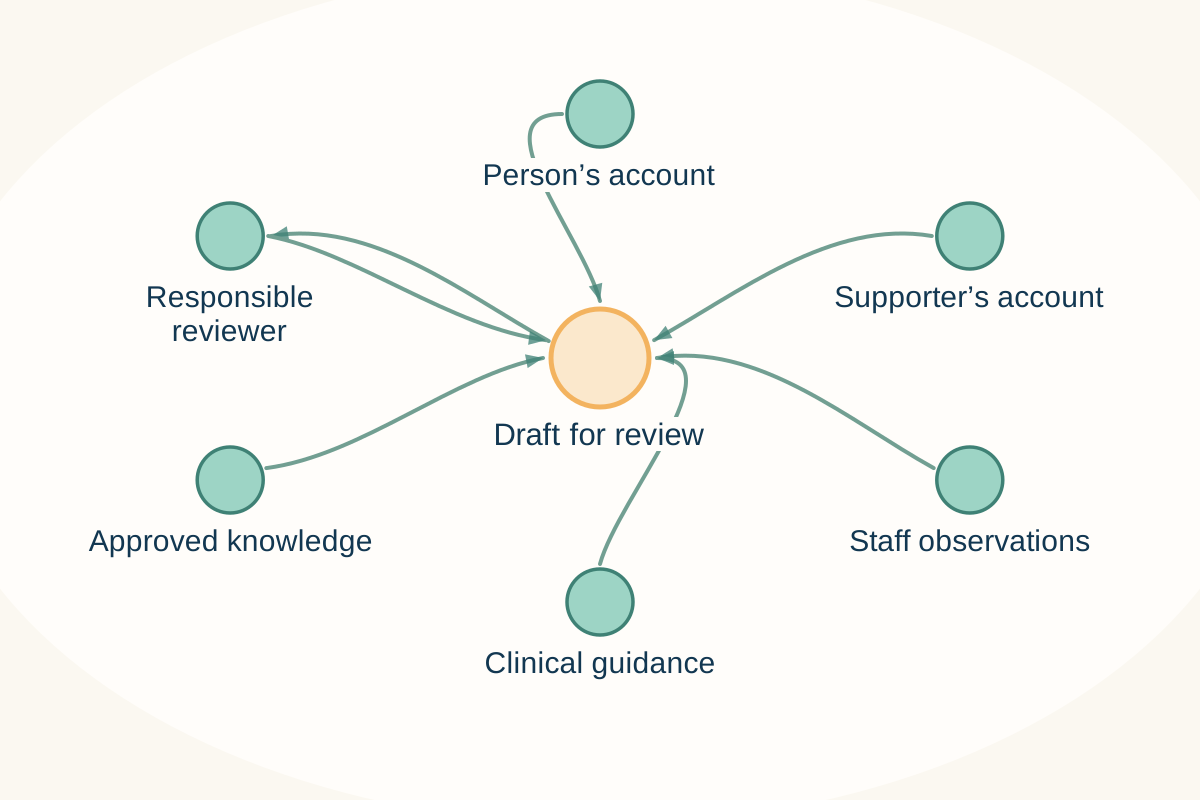
**Figure 11. Keep the sources visible in a draft for review** · Connection map
Connection map adapted from carePhysics 3.7, chapter 9. The original fictional names are generalized here to keep attention on the distinct sources and responsible review.
1. A person’s account, a supporter’s account, and a staff observation can differ; preserve their source and context.
2. Use clinical guidance only within the appropriate professional remit and configured task.
3. AI can help prepare a draft. An accountable person reviews it and decides what is appropriate to use.
[Joe Gleason · carePhysics 3.7 · chapter 9, adapted](https://genusconnect.org/carephysics/book/chapter-09)
## Knowledge and purpose change the assistance
An assistant with a general understanding of community care is different from one configured with a partner’s approved resources, service boundaries, terminology, and priorities. Local knowledge can help the experience become more relevant to the organization and its audience.
That knowledge needs maintenance. A confident answer based on an outdated service description is still a problem. Partners should identify who owns the source material, which resources may be used, and how changes reach the experience. They should also test whether the assistant recognizes questions the material cannot answer.
Purpose determines which tools are appropriate. A public information assistant may help someone explore resources. A staff assistant may help draft a pathway or organize an innovation proposal. Permission to prepare a draft does not imply permission to publish, change records, or act for a person.
## Layers of responsibility
The platform includes server-side checks around tool permissions, input structure, and approval requirements. Some workflows deliberately create proposals for human review rather than carrying out the proposed change. Those mechanisms help define what an assistant can do in a particular context.
A responsible arrangement brings several layers together: appropriate information access, clear instructions, bounded tools, review of consequential actions, and a way to inspect and improve behavior. The exact controls depend on the enabled capability. A partner should review that configuration instead of relying on the broad phrase “AI safety.”
Testing should include ordinary questions and difficult ones. Try missing information, conflicting instructions, an out-of-scope request, and a request involving someone else’s information. Check whether the response is useful, whether boundaries hold, and whether a person can reach help when the assistant cannot complete the task.
## The carePhysics connection
[Care AI — Bring Human Wisdom Within Reach](https://genusconnect.org/carephysics/book/chapter-09) places assistance within a wider understanding of care. The aim is to make useful knowledge easier to reach while preserving listening, choice, and human responsibility.
An answer can be technically fluent and still miss what someone needs. Communication and engagement models encourage a team to ask whether the response acknowledges the question, fits the situation, and offers a manageable next step. The person should be able to disagree, ask for clarification, or choose another route.
## From a useful draft to a reviewed tool
The innovation workflow can help assemble a structured submission from an idea. The practical value is to make the challenge, audience, proposed benefit, and open questions easier for a team to assess. That can shorten the distance between a frontline observation and a shared working draft.
Moving the idea into use still requires decisions about scope, testing, privacy, accessibility, integration, and support. Some focused changes can move quickly. Others need substantial review. The goal is to keep useful ideas moving at the pace the work responsibly allows, with people able to see and improve what is being proposed.
## Bring your knowledge
Choose one task where your team spends time translating its knowledge into repeatable work. Identify the approved information the assistant would need and the actions it should be allowed to take. Then define what a reviewer needs to see before accepting the result.
Test the arrangement with the people who will use it. Ask whether it saves effort, preserves their meaning, and makes uncertainty visible. Keep a route for reporting a poor answer or unsuitable suggestion. Feedback should lead to changes in content, configuration, or workflow, rather than simply asking people to be more careful.
### Explore further — Questions for an AI configuration review
Ask what information the assistant can access, which model or service is involved, what data-handling terms apply, and which tools are enabled. Identify which actions require review and who provides it. Agree how failures are reported, how changes are tested, and what happens if the assistant is unavailable. These questions turn an abstract promise into an arrangement a partner can understand and operate.
---
# 12. Trust beneath the experience
*People should be able to understand what they are being asked to trust.*
## Trust is felt in ordinary moments
A participant wants to know whether a message is visible to a relative. A staff member wants to know whether an assistant may use a private document. A partner leader wants to understand what happens if a service arrangement changes. These questions belong in the design of the experience.
Trust includes technical protection, clear responsibilities, and understandable choices. An encrypted database does not explain who should be allowed to read a record. A privacy notice does not resolve an unclear invitation. The infrastructure and the human arrangement need to support each other.
For a partner leader, the useful starting point is a concrete experience. Identify the people involved, the information required, the reason for using it, and the responsibilities at each step. That gives the technical and governance review something specific to assess.
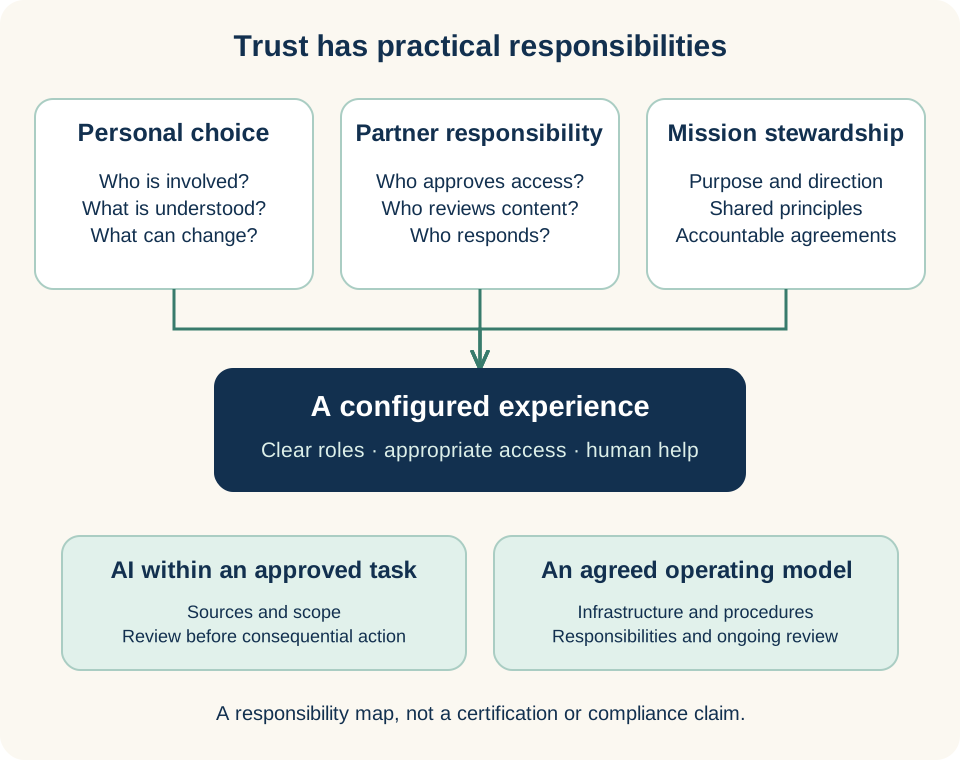
**Figure 12. Make trust a set of clear responsibilities** · Connection map
Responsibility map. Personal choices, organizational operations, and mission stewardship need practical agreements. This is not a certification or compliance claim.
1. Clarify whom the person wants involved and what authority applies to each role.
2. Name the people responsible for access, content, follow-through, and review.
3. Agree AI scope and the operating arrangement. Infrastructure supports that work; it does not replace contracts, procedures, or ongoing review.
## AWS and the operating arrangement
The genus architecture uses AWS cloud services. For your deployment, agree how storage is protected, how long information is retained, and who operates and monitors the environment. Ask how backups, service interruptions, access changes, and updates will be handled in the arrangement you are considering.
AWS provides HIPAA-eligible services and a Business Associate Addendum for covered uses. Its [HIPAA guidance](https://aws.amazon.com/compliance/hipaa-compliance/) explains that customers share responsibility for protecting health information and must meet the applicable service and agreement requirements. Using AWS does not, by itself, make an application or partner workflow HIPAA compliant.
A proposed health-information deployment needs review of the actual configuration, contracts, access, monitoring, operations, and uses of data. The book provides a way to ask those questions; it is not a compliance determination for a particular organization or environment.
## Personal, organizational, and shared responsibilities
At the personal level, people need understandable information about participation, invitations, and sharing. The arrangement should account for who has authority to make decisions and how that authority is represented. Different relationships may require different processes.
At the organizational level, the partner needs defined roles, maintained policies, appropriate training, and an operating process for questions or incidents. It should know which responsibilities it retains and which are carried by genus or another provider. A contract and a working procedure serve related but different purposes.
At the ecosystem level, shared learning needs a clear purpose and limits. A useful lesson may come from a local experience, but that does not automatically make the underlying personal information available for wider use. The team should establish what can be shared, with whose permission, and in what form.
## Continuity deserves a direct conversation
Partners may have different hosting, licensing, or code-access requirements. Those arrangements need to be discussed for the particular audience and service. Questions about long-term availability, support, updates, and exit planning should be answered in the relevant agreement and operational plan.
[genusCommunity Foundation](https://genusconnect.org/companies#genuscommunity-foundation) expresses our commitment to keeping people, families, and community benefit central as the ecosystem grows. The practical rights and responsibilities of a partner need to be stated explicitly, including what continues if an arrangement changes.
Avoid asking a broad word such as “ownership” or “immutable” to carry more meaning than the actual arrangement supports. Ask which information or record is involved, who controls access, what may change, and how corrections, retention, and deletion are handled. Clear answers are more useful than a sweeping promise.
## The carePhysics connection
[Shared Tools, Local Wisdom](https://genusconnect.org/carephysics/book/chapter-13) connects common capabilities with local responsibility. Governance helps preserve the purpose of an interaction as it moves through content, communication, AI assistance, and learning.
Trust also depends on the experience of being heard. Give people a practical way to ask what a feature does, correct a misunderstanding, or raise a concern. The response should reach someone who can act, and the organization should learn from patterns in those questions.
## Where AI helps
AI can assist a team in organizing a configuration review, comparing a draft workflow with approved policies, or identifying questions that require an owner. It can help make a complex discussion easier to navigate.
An assistant does not establish compliance or replace accountable review. Keep the decision and its rationale with the people responsible for the arrangement. Where a request involves sensitive information, use only the approved tools and channels for that information.
## Bring your knowledge
Before beginning a pilot, agree on the scope of information, access, human support, and review. Identify the questions that must be resolved before real participant information is used. Then revisit the arrangement when the audience, capabilities, or data flows change.
### Explore further — Make the agreement usable
Turn the important responsibilities into language the operating team can use. Who receives an access question? Who can change a role? Who reviews a new integration? Who handles a service interruption? Where is the current policy? The answers should be easy to find and kept current. An agreement supports trust when the people doing the work can put it into practice.
---
# 13. Example use cases
*The features become useful when local knowledge gives them a purpose.*
## What organizations can learn across the whole journey
**Better care. Time returned to people. A stronger organization.**
An organization needs to know whether the whole experience improves its bottom line. Better quality, less duplicated work, prepared staff, appropriate referrals, and relationships that last are routes worth testing. A key performance indicator, or KPI, connects a benefit people recognize with an operational change and a result the organization can verify. The connection must be measured, not assumed.

**People behind the measures**
- Participants: useful support and a sense of purpose.
- Families: clearer next steps and less repeating.
- Staff: preparation, support, and time to connect.
Intended benefits to verify with people; illustration, not customer results.
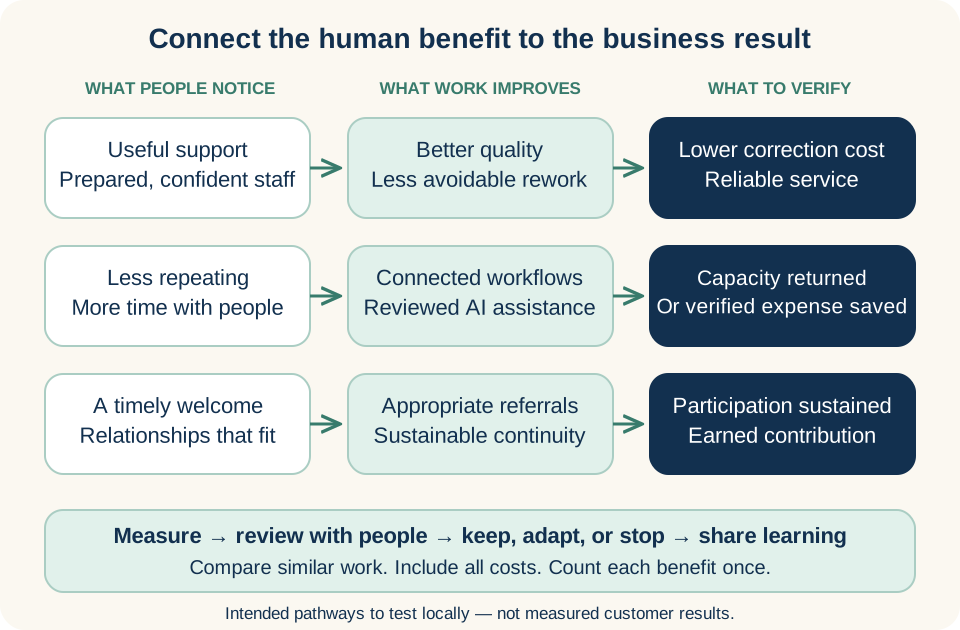
**How better care can strengthen the organization** · Connection map
A value map for discussion, not a chart of measured returns. Each connection is a hypothesis to check in a partner’s own workflow.
1. Quality and preparation: support people find useful, with staff ready to act, can reduce avoidable corrections. Verify the experience and the cost of rework.
2. Efficiency: connected work and reviewed AI assistance can return time to people. Check complete staff effort; extra capacity becomes cash savings only when expense actually falls.
3. Access and continuity: timely responses and relationships that fit can support appropriate participation. Verify contribution after delivery costs; include implementation costs and count each benefit once.
- **Referrals and access:** useful responses and appropriate first services; fewer opportunities lost between inquiry and welcome.
- **Training and readiness:** current learning applied in practice; less avoidable correction and repeated supervision.
- **Participant continuity:** support that continues to fit; fewer avoidable departures, with healthy transitions recognized as successes.
- **Staff continuity:** sustainable work and support; reduced disruption and recruitment burden where verified.
- **Partner relationships:** shared commitments and accepted handoffs; dependable routes into and between services.
- **Community connection:** useful relationships people confirm; stronger support around participation.
- **Connected, personalized workflows:** accurate, relevant support and completed responsibilities; better quality across the whole journey.
- **Efficiency and time returned:** total staff effort, waiting, and rework; capacity that can serve people or reduce actual expense.
- **Learning loops and capturing wins:** reviewed ideas tested and decisions shared; useful improvements carried forward.
### AI assistance across a connected workflow
A need is expressed → the right person receives it → relevant support is prepared → people review and act → experience is shared → the next interaction improves.
AI can help personalize approved resources, organize permitted observations, and prepare drafts across the workflow. People review meaning, accuracy, permissions, and consequential actions. Measure the complete effort, including those checks and corrections, rather than draft-generation speed. Connected work still needs responsible people and agreed access.
Choose a small scorecard using the [Organization KPI definitions](#companion-organization-kpi-definitions). Pair quality and experience with time, service, and financial evidence. Capacity returned is not automatically cash saved. No combined score should rank families, participants, or staff.
For oversight across departments and locations, use common definitions and review periods while preserving local context. Show which services and records are included, missing, or not comparable. Combine compatible underlying counts rather than averaging percentages. The [central coordination discussion](#chapter-09-central-direction-local-delivery) connects those measures with shared knowledge, distribution, and learning.
### Agree the value before measuring
Use this checklist in a partner conversation. Ticks are temporary, remain in this browser, and are not sent anywhere.
- [ ] **Start with people:** whose experience should improve, and what would they notice?
- [ ] **Choose one complete workflow:** include preparation, handoffs, review, and corrections.
- [ ] **Set a fair baseline:** agree comparable cases, the denominator, and the review period.
- [ ] **Keep a quality check:** pair time saved with accuracy, useful support, and staff workload.
- [ ] **Account for value:** separate capacity from cash; include costs and avoid counting the same benefit twice.
- [ ] **Close the learning loop:** name an owner, review with the people involved, and share the next decision.
For a first scorecard, choose one quality measure, complete-workflow effort, an access or continuity measure, and verified financial value. Record **baseline → current result → difference → quality check → next decision**. Use “not yet measured” where evidence is missing.
## Day Center: from first contact to what comes next
[Read the three-page Day Center executive brief](day-center-executive-summary.html) for the value, connected workflow, and starting KPI scorecard, with a downloadable PDF.
Sam enjoys gardening and having something useful to contribute. Before a first visit to the fictional Riverbend Day Center, Sam and family member Jamie want to know whether there will be room for those interests. Jamie also hopes for something more helpful than knowing that Sam attended: a little understanding of the day, and a way to share what happens at home.
Their story follows an **end-to-end workflow and ecosystem** across public resources, the partner portal, the care app, and human conversations. Riverbend brings its governance, care strategies, approved knowledge, and communication style. Those contributions shape the experience: a welcoming introduction, preparation that starts with the person, clear review responsibilities, and updates families can use.
All six cases in this chapter are fictional configurations for discussion, not customer results. Riverbend and Sam also appear in the book’s demonstration screens; the gardening story is an invented illustration, not an account shown in those screens. The partner must agree which capabilities, integrations, and operating responsibilities apply. The examples show people making connections, rather than assuming software completes every handoff.
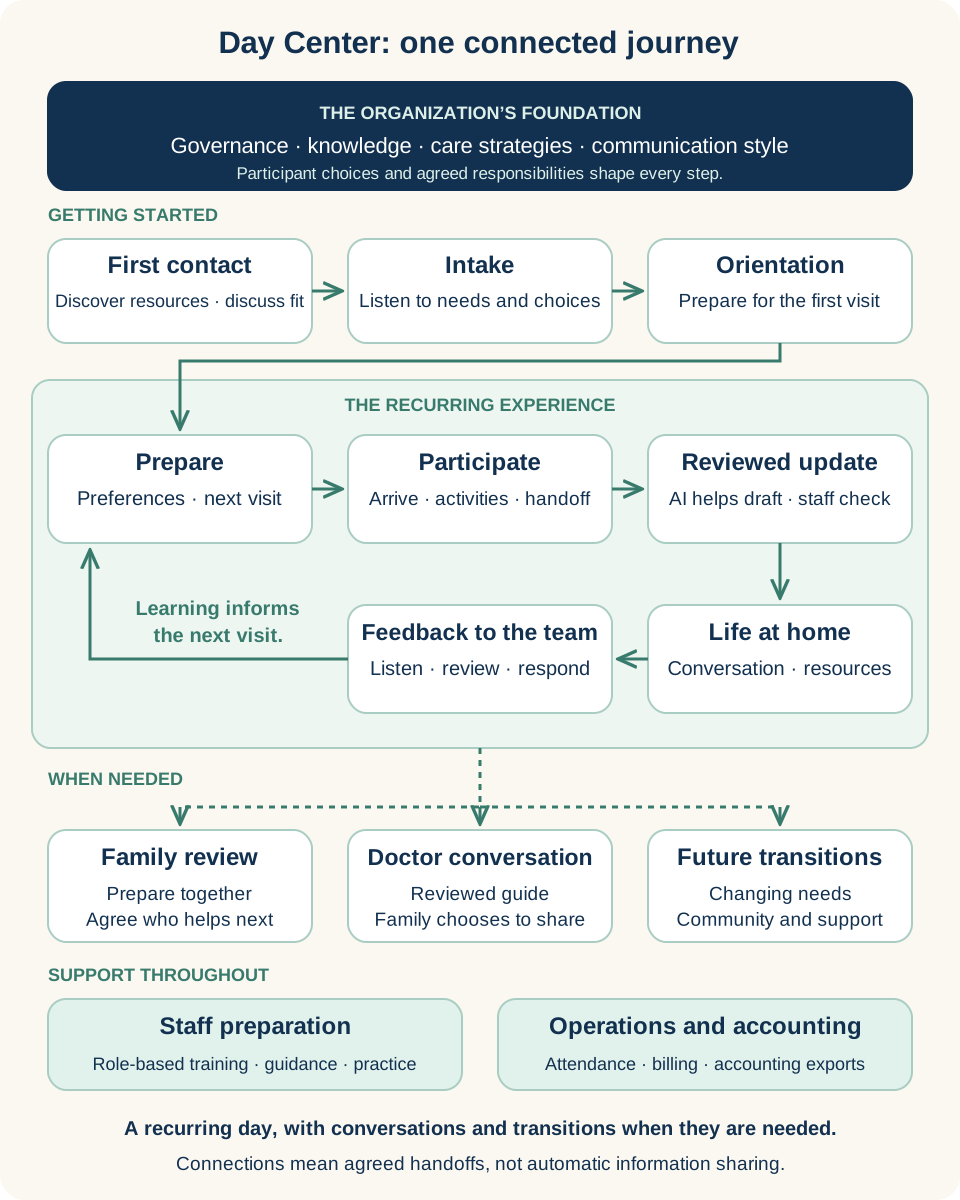
**Figure 13. Day Center: one connected journey** · Connection map
An illustrative Day Center configuration. Daily participation repeats; family reviews, doctor conversations, and transitions happen when needed. Connections represent agreed responsibilities, not automatic information sharing.
1. Getting started connects first contact, staff-led intake, and orientation around participant choices and the organization’s knowledge and communication style.
2. The recurring experience connects preparation and participation with a staff-reviewed update, life at home, and feedback considered by accountable people before another visit.
3. Family reviews, family-chosen doctor conversations, and future transitions are separate branches used when needed; they are not mandatory stages after each visit.
4. Role-based staff preparation and operational work, including attendance, billing, and accounting exports, support the experience throughout.
### Finding a starting point
Jamie finds Riverbend through a community introduction. Its website and public resources explain the program, the people who welcome participants, and how to contact the team. A configured information assistant can help locate approved answers. Jamie asks whether Sam could contribute to activities as well as join them. A staff member discusses the question with Sam and the family, explains the support available, and agrees the next conversation. That exchange begins a relationship before a form is completed.
### Intake and understanding
Staff work through the Adult Day intake with Sam and those appropriately involved, bringing together preferences, practical needs, health and daily-living information, family circumstances, and communication choices. Sam mentions gardening; Jamie explains what support the family can offer. Staff check their understanding with Sam and agree who may participate and receive updates. The interest becomes context for planning, rather than a label that determines every activity. This example uses staff-led intake; independent completion at home remains a separate capability to confirm.
### Orientation and preparation
The coordinator explains the first visit and offers the family a relevant preparation resource through the care app’s Family Guide, with a printed explanation or conversation when preferred. Riverbend’s welcome practice asks staff to learn what someone hopes to enjoy, not only what assistance they need. Role-based learning, local procedures, and practice prepare staff and volunteers to use that approach. Before the visit, the responsible team member checks Sam’s preferences with the activity lead and discusses a suitable opportunity to contribute. This is a deliberate staff handoff.
### The daily experience
The team checks the roster and expected visits, then records Sam’s arrival and attendance. A reservation expresses a plan; check-in records what happened. During a suitable gardening activity, Sam chooses to help and shares a familiar tip. Staff notice the contribution alongside participation, meals, rest, and other observations. They ask what Sam enjoyed instead of assuming the activity was successful. At departure, the appropriate check-out record accompanies a human handoff. The [portal demonstration](#figure-portal) shows how practical cues can remain visible while people do this work.
### A story worth sharing
A staff observation gives the designated reviewer something specific to work with: Sam contributed a gardening tip and enjoyed discussing it. AI assistance can help organize recorded material into a daily-summary draft. The reviewer checks accuracy, tone, recipient, and suitability, removes unsupported conclusions, and adds a personal note before sharing through the agreed route. Riverbend’s communication style favors a recognizable moment over a generic report that everything went well. The [daily-summary example](#figure-daily-summary) illustrates draft review and family sharing; it does not contain this invented gardening account.
### Connected life at home
Jamie reads the reviewed update in the care app and asks Sam about the gardening conversation. It opens a moment they can share. Relevant education and resources can also help the family prepare for another visit. Email or printed summaries can support other preferences. Jamie contributes a short response through a supported family-feedback route. Riverbend assigns someone to review those responses and bring useful context to the team. Where meeting tools are configured, invited people can also connect in a family meeting room, with attendance and purpose agreed beforehand.
### Family reviews and doctor conversations
A family review can bring selected observations together with Sam’s priorities and Jamie’s questions. Staff prepare the overview; people correct the picture and agree who will follow through. If a doctor conversation would help, a separate reviewed guide can organize relevant observations and questions the family chooses to take. It supports communication, rather than replacing a medical record or assessment. It is not automatically sent to a doctor. The family decides what to share afterward. These conversations happen when useful, rather than forming compulsory steps after every visit.
### Keeping operations connected
Behind the visit, attendance, charges and their reasons, recorded payments, credits, statements, receipts, and daily closeout support the center’s work. The person responsible for billing checks discrepancies; supported ledger exports can feed an agreed accounting process. This is billing and accounting support, not a replacement for every finance system. Riverbend assigns operational responsibilities so an unresolved record has somewhere to go. The same principle applies to a family question: reliable follow-through depends on someone knowing it is theirs to address.
### Changing needs and future transitions
Sam’s interests, support needs, or preferred schedule may change. The family might explore another community activity, additional help at home, or a different service. Reviewed information and relevant resources can support those conversations. Riverbend and the family agree what to share, who receives a handoff, and which care-app relationships can continue. Community centers, volunteers, home-care organizations, and other partners may contribute. Continuing relationships are the aim; access to another organization’s information and responsibility for a new service require their own arrangements.
### Learning travels back into the experience
The staff member reviewing Jamie’s response brings it to the activity lead before Sam’s next visit. Sam is asked whether another opportunity would be welcome. A family observation has reached a person able to act on it. It has not automatically changed a care plan or become a claim about an outcome.
That same habit can improve the service. If families repeatedly struggle with a welcome instruction, the team can revise the approved explanation and check whether it helps. **Listen, prepare, review, try, and learn together** applies to content, pathways, staff learning, and ideas for new tools. Learning belongs in the next conversation, not only in a dashboard.
### The carePhysics connection
[Make Belonging Practical](https://genusconnect.org/carephysics/book/chapter-05) frames a welcome where Sam can contribute. [Pathways](https://genusconnect.org/carephysics/book/chapter-07) connects an invitation with practical support and ownership. [Begin with One Meaningful Pathway](https://genusconnect.org/carephysics/book/chapter-15) helps the team choose a manageable first test. Riverbend’s knowledge makes those ideas local: appropriate activities, useful language, realistic commitments, and staff who understand the people they serve.
### Day Center — measures to learn from
Track intake-to-first-attended-day, appropriate participant continuity, and total staff effort per reviewed family update alongside its usefulness. An intake date is not a referral date. Jamie gains a conversation; staff can examine rework and time available for people. Use the [shared definitions](#companion-organization-kpi-definitions) to test whether service continuity or verified costs change. This story demonstrates no measured saving.
### Explore further — Start with one connected day
Rehearse a small version before attempting the whole arrangement: preparation, one visit, one reviewed update, one family response, and a staff follow-up. Use fictional information and include someone who does not use the app. Name who prepares, checks, shares, receives, and responds. Confirm the configured tools and any manual handoffs, the agreed communication route, and how an urgent concern reaches a person.
Ask whether Sam recognizes the account, whether the family finds something useful in it, and whether feedback reaches someone able to respond. Can staff complete those steps without unnecessary duplicate work? Review the answers together before extending the workflow to meetings, accounting connections, or transitions. These are questions for a purposeful test, not promised improvements.
## Five shorter configurations
The following cases use the same pattern at a smaller scale: a person’s purpose, the partner’s contribution, connected steps, responsible AI assistance, and a question worth learning from. Each is a proposed arrangement to rehearse with the people involved. The mix of tools changes with the service; the need to listen and follow through remains.
## A health-system transition home
Maya is preparing to leave hospital. Her sister Lena can help for a few days, and a home-care organization expects to make its first visit. Maya wants clear next steps without organizing every conversation herself. Lena needs to understand what she can reasonably take on.
**The partner’s contribution.** The health system brings its discharge process, approved education, and escalation instructions. The receiving organization brings visit preparation and a contact process. Maya’s preferences and Lena’s capacity help shape the arrangement. A preparation pathway, selected resources, an appropriate care community, and portal tools connect the agreed work. Access to clinical records requires a separate integration and access agreement.
**The handoff.** In the rehearsal, Maya asks what to prepare for the first visit. The question reaches an inbox, but neither organization has agreed who will answer. The receiving team names a contact, explains the route if the question remains unanswered, and checks that Maya understands it. A message becomes useful when someone accepts responsibility for the next step.
**AI assistance and review.** AI could help prepare a plain-language draft from approved information or organize questions for review. An appropriately authorized professional checks clinical information and consequential advice before use. Separate organizations’ records and family access are not silently combined.
**What to learn.** Can Maya explain the first agreed step and where to ask for help? Does the receiving contact recognize the handoff? Consider the [teach-back approach](https://genusconnect.org/carephysics/book/r2#r2--p05254) alongside [supported pathways](https://genusconnect.org/carephysics/book/chapter-07). Check the work created for staff as well as clarity for Maya and Lena. Agree which community connections and organizational access can continue when the service changes.
### Health-system transition — measures to learn from
Track accepted handoffs, eligible referrals reaching first service, and staff effort spent resolving incomplete handoffs. Check Maya’s understanding alongside them. Clear ownership may reduce chasing and lost service opportunities; measure both rather than assuming savings. Use the [shared definitions](#companion-organization-kpi-definitions), keeping pending referrals and missing feedback visible.
## A home-care organization supporting a family
[Read the three-page Homecare executive brief](homecare-executive-summary.html) for the connected workflow, practical benefits, and starting KPI scorecard, with a downloadable PDF.
Noah lives with a disability and wants support that fits around work and friendships. His father helps with some practical tasks, and his cousin visits occasionally. The home-care team provides an agreed service. Noah does not want every supporter involved in every part of his life.
**The partner’s contribution.** The organization brings knowledge of visit arrangements, service boundaries, preparation, and how to communicate changes. Noah explains what makes help welcome. A care community, selected resources, supporter preparation, and portal workflows can support that agreement. Family involvement follows Noah’s choices and the appropriate access arrangements.
**The handoff.** Noah’s cousin can no longer help at the usual time. Rather than repeating a reminder, the coordinator discusses the change with Noah and clarifies what the service can provide. They agree a realistic next step and tell the people affected. The updated agreement matters more than whether the original task was completed. Noah should not have to retell the change to every person involved; the coordinator confirms who needs the agreed update and who will make that contact.
**AI assistance and review.** AI could help draft a clearer explanation or an alternate version of a preparation resource. Noah and the team review whether it preserves his meaning and fits the actual service. A draft does not reassign staff, expand the service, or commit a family member to help.
**What to learn.** Are responsibilities clearer without reducing Noah’s choices? Can someone discuss changed capacity without being treated as unhelpful? [Self-Determination Theory](https://genusconnect.org/carephysics/book/r2#r2--p05162) brings attention to choice, confidence, and connection; [social support](https://genusconnect.org/carephysics/book/r2#r2--p05211) asks what help is actually available. Review unwanted messages, repeated explanations, and whether Noah knows whom to contact when the arrangement stops fitting his life.
### Home care — measures to learn from
Track appropriate participant continuity, follow-through on changed arrangements, and total coordination effort per completed change. Ask Noah whether his choices were preserved. Less repeated explanation could return staff capacity while dependable support sustains the service. Verify that connection with local records and the [shared definitions](#companion-organization-kpi-definitions); unsuitable retention is not success.
## A community organization opening a path to participation
Amara recently moved to the area and hopes to meet people through music. A local program sounds interesting, but she is unsure whether the entrance is accessible or whether someone will welcome her. A volunteer recognizes both questions from earlier conversations.
**The partner’s contribution.** The organization brings local knowledge of activities, accessibility, volunteers, and actual capacity. A public wall or interactive landing page can offer an introduction, a short video with a text alternative, and a route for questions. A preparation pathway can help with a first visit; community participation can follow if useful and chosen.
**The handoff.** The existing invitation says little about arrival. The volunteer brings Amara’s question to the program lead. Together they prepare a clearer explanation, confirm a welcome contact, and check with Amara whether anything is still missing. The revised resource can help other newcomers too. The team also names who will keep arrival information current, so a changed entrance or contact does not leave the next visitor facing the same uncertainty.
**AI assistance and review.** AI could help organize recurring questions or draft alternatives from approved local information. Staff verify the details before publishing. An assistant cannot promise an available place, ride, or volunteer simply because someone asks for one.
**What to learn.** Can Amara picture the first visit and reach a person if needed? Is she comfortable choosing not to attend? [Make Belonging Practical](https://genusconnect.org/carephysics/book/chapter-05) connects the welcome to participation; [Social Cognitive Theory](https://genusconnect.org/carephysics/book/r2#r2--p05203) invites consideration of a relatable example. Ask what felt helpful or unclear, including when someone decides the activity is not a fit. Set response expectations and community rules before expanding the invitation.
### Community participation — measures to learn from
Track response time, person-confirmed welcome connections, and staff effort answering repeated arrival questions. Ask whether Amara felt welcome. A clearer explanation can be tested for useful participation and less repeated work. The [shared definitions](#companion-organization-kpi-definitions) distinguish a chosen nonattendance from an unanswered invitation; attendance alone is not value.
## Independent living: belonging on your own terms
Rosa has moved into an independent-living community. She wants to meet neighbors through a book group while keeping her own schedule. Her family is interested in how she is settling in, but Rosa wants to decide what she shares and which invitations she accepts.
**The partner’s contribution.** The community brings its activity information, local resources, welcome practices, and knowledge of residents’ interests. An orientation pathway and selected content can introduce the people and places Rosa may find useful. Public resources, an appropriate community space, and portal content tools support the proposed arrangement. Participation and family involvement remain choices to discuss with Rosa.
**The handoff.** The book-group invitation gives a time and room but leaves Rosa wondering whether newcomers need to have finished the book. She asks the welcome coordinator, who checks with the host and provides an answer. With the host’s agreement, the coordinator updates the invitation for future newcomers. Rosa can decide whether to join without having to guess what will be expected. If she declines this time, the coordinator can ask whether she wants information about a future meeting rather than interpreting silence as a request for more reminders.
**AI assistance and review.** AI could help the coordinator draft clearer orientation content or summarize common questions for a human reviewer. The host checks practical details and commitments before the resource is shared. The example uses shared communication and content capabilities; it does not assume a specialized independent-living management system.
**What to learn.** Did Rosa get the information she needed while retaining control over participation and family updates? Use [Self-Determination Theory](https://genusconnect.org/carephysics/book/r2#r2--p05162) and [Make Belonging Practical](https://genusconnect.org/carephysics/book/chapter-05) to discuss choice and welcome. Ask whether the experience helped her connect on her terms, rather than treating attendance alone as success.
### Independent living — measures to learn from
Track useful introductions, responses completed, and effort resolving repeat orientation questions, alongside residents’ reported choice. Rosa gets clarity; the team tests whether improved invitations reduce rework. These may support a stronger resident experience, but do not establish occupancy or retention gains. Use local records and the [shared definitions](#companion-organization-kpi-definitions).
## Assisted living: familiar routines, connected support
[Read the three-page Assisted Living executive brief](assisted-living-executive-summary.html) for the connected workflow, resident and staff benefits, and starting KPI scorecard, with a downloadable PDF.
Daniel is settling into an assisted-living setting. He values a quiet start to the morning and enjoys conversation later in the day. A family member wants to contribute what has helped at home. Daniel wants staff to ask him directly, even when someone else knows his history well.
**The partner’s contribution.** The organization brings its welcome process, agreed service responsibilities, communication style, and staff preparation. Daniel’s preferences and his family’s observations inform orientation resources and appropriate team conversations. Selected content, an invited care community, and portal tools can support this arrangement, with sharing agreed for each audience.
**The handoff.** During settling in, an invitation arrives at a time Daniel finds difficult. The family mentions the pattern to the agreed contact, who asks Daniel what would work better and brings his preference to the responsible team member. They agree an adjustment within the service and a time to check back. The family receives the appropriate update without becoming responsible for directing staff. The discussion also gives the team a practical question to include in future welcomes: when does a person most enjoy conversation or activity?
**AI assistance and review.** AI could help prepare a draft welcome resource or organize questions for a family review from approved, appropriately shared information. Staff check the account with the people involved before using it. This communication example does not assert medication administration, clinical charting, emergency monitoring, or specialized facility-management functionality.
**What to learn.** Does Daniel feel heard, and do staff know who will follow through? Has the family gained a useful route for questions without receiving information beyond the agreement? [Social support](https://genusconnect.org/carephysics/book/r2#r2--p05211) and [Pathways](https://genusconnect.org/carephysics/book/chapter-07) help frame reliable help and clear responsibility. Periodic review should revisit the arrangement as preferences or needs change.
### Assisted living — measures to learn from
Track observed staff readiness, preferences followed through, and total effort completing reviewed family updates, alongside communication usefulness. Daniel should recognize the support; staff should have less avoidable correction. Test those connections before attributing financial benefit. Individual learning records alone do not establish readiness. Use the [shared definitions](#companion-organization-kpi-definitions) and local review.
## Bring your knowledge
Choose the example closest to your work and replace its assumptions with your people, resources, and commitments. Ask participants and frontline staff where the sequence would break down on a busy day. Begin with one useful connection, name its owner, and agree what you will review together. Use [Begin with One Meaningful Pathway](https://genusconnect.org/carephysics/book/chapter-15) alongside the partner worksheet. The aim is an arrangement people can recognize, use, and improve together.
---
# 14. Build together, learn together
*A good idea needs somewhere to go and people who will help it grow.*
**Industry perspective**
> “Refine the change, based on what was learned from the test.” [*](#quotation-context)
Institute for Healthcare Improvement
[Model for Improvement: Testing Changes · Act step](https://www.ihi.org/library/model-for-improvement/testing-changes) · Accessed 2026-10-10
The Act step of Plan-Do-Study-Act: learn from a small test, then decide what to change or test next.
## Listen for the useful detail
A volunteer discovers that a different opening question helps someone feel more comfortable during a call. A family member notices a missing explanation. A frontline team finds a simpler way to prepare for a visit. Each observation may contain something worth exploring.
The first step is to make it possible to share the idea in ordinary language. What happened? What was difficult? What seemed to help? Who might benefit? A person should not need to arrive with a finished product proposal before the organization will listen.
The genus innovation workflow can help turn that description into a structured draft. AI assistance can organize the challenge, intended value, and proposed approach so the team has something concrete to discuss. The originating person should be able to check whether the draft still reflects what they meant.
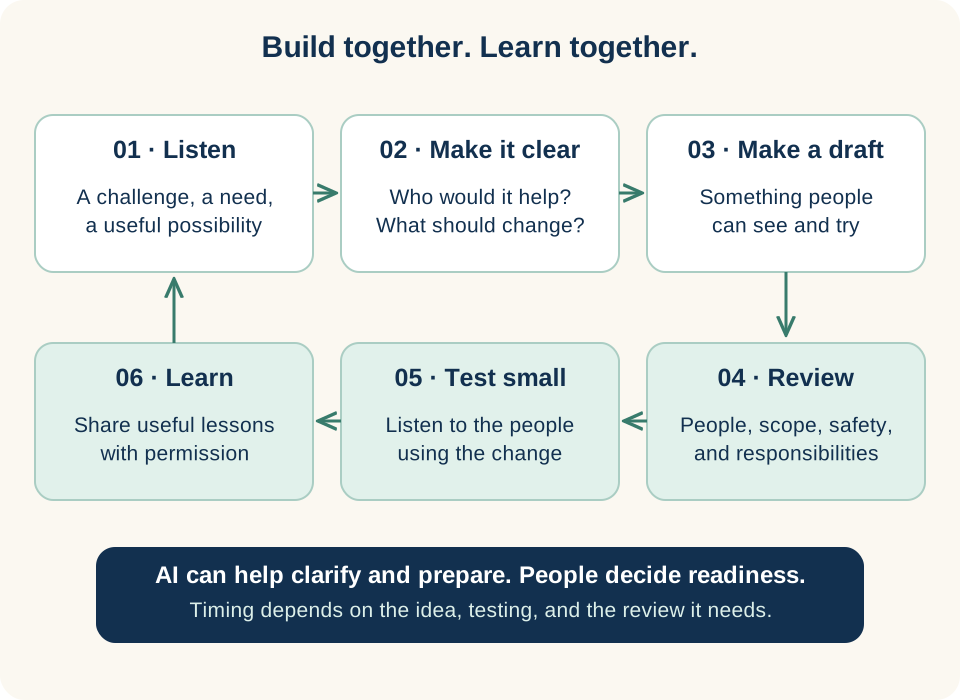
**Figure 14. Give a useful idea a path into practice** · Connection map
Connection map for collaborative improvement. Progress depends on listening, a useful test, and the review the work needs; this is not a fixed delivery schedule.
1. Start with a challenge or need and explain the value of a possible change.
2. Prepare something people can see and try, then review scope and responsibilities before testing.
3. Learn with the people using it. Share useful lessons with permission and carry them into the next revision.
## Move from an observation to something people can try
A small prototype can make a conversation more useful. People can react to wording, a sequence, or a working example instead of trying to imagine a specification. They may change the idea substantially, and that can be the most valuable part of the work.
AI-assisted design and development can shorten the time needed to prepare some drafts. The ambition is to keep conversations active while ideas become visible. A focused improvement may move toward a usable version in days; complex changes take longer, particularly when clinical, privacy, integration, or operational review is required.
The useful measure is whether the process helps the team learn and produce something it can responsibly support. Speed matters when it keeps a real need in view. It should not hide unresolved questions about who will use the tool, what it changes, or who maintains it.
## Learn from a small, purposeful test
The [Model for Improvement](https://www.ihi.org/library/model-for-improvement) asks teams to define an aim, decide how they will recognize improvement, and identify changes worth testing. Its [Plan-Do-Study-Act approach](https://www.ihi.org/library/model-for-improvement/testing-changes) supports learning through small tests and revision.
For the volunteer’s idea, a first test might be a reviewed conversation guide used in a defined setting. The team could ask whether people felt more comfortable, whether volunteers found the wording natural, and when the approach did not fit. The test should respect the organization’s consent, supervision, and information-handling requirements.
A lesson becomes more useful when it includes context. “This phrase worked” is incomplete. Explain the situation, the intended purpose, what was observed, and the limits of the observation. Other teams can then decide whether it is relevant to their circumstances.
## Capturing wins
A win may be a better question, a clearer explanation, a useful resource, less duplicated work, or a handoff that reaches someone able to help. Give that observation a route into learning:
1. Describe the situation and intended purpose.
2. Record what someone tried and what was observed.
3. Preserve the context, uncertainty, and anything that did not help.
4. Review what may be shared, with whom, and under which permissions.
5. Try the idea in an appropriate setting with an agreed reviewer.
6. Return to contributors with the decision and what was learned.
AI can organize permitted information; the contributor checks its meaning and responsible people decide what to try and share. Capture limits as well as benefits. A useful win connects a person’s experience with improved quality, less effort, or more dependable service. Verify any financial effect separately.
Use the [learning-loop definitions](#companion-learning-loops-and-capturing-wins) to return reviewed decisions to contributors. Retain, change, stop, or do not proceed can all close a loop. The aim is learning that strengthens care and the organization, not a growing count of positive stories.
## Share learning without taking more than was offered
A contribution can be shared voluntarily and reviewed before wider use. That does not require automatic call recording or unrestricted reuse of personal information. Teams can often describe an approach without identifying the people involved.
Agree what the contributor is comfortable sharing and what the organization may publish. Remove unnecessary personal details and review the result. Where a story or example still identifies someone, the relevant permissions and review remain necessary. The aim is to carry useful learning forward while respecting the relationship from which it came.
## The carePhysics connection
[From Local Experience to Shared Learning](https://genusconnect.org/carephysics/book/chapter-14) provides the main connection. [Scoring — Learn What Helps](https://genusconnect.org/carephysics/book/chapter-10) encourages a careful look at what measures can and cannot tell us.
Combine observations, experience, and practical measures. A tool may be used often because it is helpful, because it is required, or because another route is difficult. Ask people what the activity means. Keep the person’s purpose visible as the team decides what to retain, change, or remove.
## genusLabs and the next opportunities
genusLabs describes a direction in which people can propose and help create tools, games, and features for varied communities. The opportunity is to connect a useful idea with the people and context where it can help. Review, testing, and support belong before ecosystem release.
Some ideas may grow into products of their own. Others may remain small improvements that make a particular community’s day easier. Both can have value. This direction does not mean unrestricted public publishing is currently available.
## Bring your knowledge
Begin with one need, one audience, and one outcome worth working toward. Bring the people closest to the need into the conversation. Use a draft to make the idea visible, agree how it will be reviewed, and decide what would help you learn from a first test.
Then return to the people who contributed. Show what changed, explain what is still uncertain, and invite the next observation. Building together is an ongoing relationship: listening, trying, learning, and making room for someone else’s understanding.
### Explore further — An idea worth bringing forward
Describe the challenge, who experiences it, and what better would look like. Add an example and any constraints the team should understand. Say what you have already tried and what you do not yet know. That is enough to begin a useful conversation. The partner worksheet in the companion turns these questions into a practical starting brief.
---
# Reference companion
*Keep the main conversation about people. Use these references when a detail needs a closer look.*
## Find the capability
The following routes through the guide connect practical questions with the chapters that address them. A capability may need configuration, an agreement, or further development for a particular use. Use the partner discussion to establish which applies.
- **Mission and communities of care:** Chapters 1–3 connect purpose, models, partner knowledge, and governance.
- **A modular platform:** Chapter 4 connects public wall, care app, and portal with shared organizational direction and local communities.
- **Care across changing services:** Chapter 5 covers continuity, invitations, participation, and transition agreements.
- **Several communities and roles:** Chapter 6 covers membership, switching, public-group planning, and different forms of contribution.
- **Website embeds and interactive landing experiences:** Chapter 7 covers public resources, conversation, and human handoffs.
- **Articles, videos, and interactive content:** Chapter 8 covers relevance, formats, content design, and editorial responsibility.
- **Partner operations:** Chapter 9 covers individual/bulk contact and pathway placement, reviewed imports, departments and locations, central branding and knowledge, training, and scoped reporting.
- **Supported sequences:** Chapter 10 covers pathways, invitations, exceptions, endings, and rehearsal.
- **AI assistance and controls:** Chapter 11 covers configured models, knowledge, bounded tools, proposals, and review.
- **Cloud infrastructure and trust:** Chapter 12 covers AWS, responsibilities, access, continuity questions, and partnership terms.
- **Example use cases:** [The Day Center journey](#chapter-13-day-center-from-first-contact-to-what-comes-next) in Chapter 13 connects intake, orientation, staff preparation, daily participation, reviewed summaries, family and doctor conversations, billing support, and future transitions. Shorter health-system, home-care, community-participation, independent-living, and assisted-living examples follow. Each connects a person’s purpose with partner knowledge, agreed handoffs, reviewed AI assistance, and a question to learn from.
- **Organization KPIs:** [Shared framework](#chapter-13-what-organizations-can-learn-across-the-whole-journey), case measures, and [definitions](#companion-organization-kpi-definitions) connect people’s benefits with quality, efficiency, continuity, and verified financial value.
- **Innovation and learning:** Chapter 14 connects frontline ideas, reviewed prototypes, useful measures, shared learning, and genusLabs direction.
## The carePhysics connections
Start with the [carePhysics contents](https://genusconnect.org/carephysics/book). Its chapters develop the human ideas more fully; its reference companion provides model descriptions and sources. A model supplies a useful lens, not proof that a particular implementation will succeed.
- [COM-B](https://genusconnect.org/carephysics/book/r2#r2--p05142): examine a specific action through capability, opportunity, and motivation. Used in Chapters 2, 10, and 13.
- [Self-Determination Theory](https://genusconnect.org/carephysics/book/r2#r2--p05162): consider autonomy, competence, and relatedness. Used in Chapters 2 and 13.
- [Social Cognitive Theory](https://genusconnect.org/carephysics/book/r2#r2--p05203): consider examples, practice, and the relationship between people and their environment. Used in Chapters 2 and 13.
- [Social support](https://genusconnect.org/carephysics/book/r2#r2--p05211): look at the different kinds of help a person can rely on. Used in Chapters 2, 6, and 13.
- [Motivational interviewing](https://genusconnect.org/carephysics/book/r2#r2--p05243): explore a distinct approach to conversations about change. Introduced in Chapter 2; appropriate training and context matter.
- [Teach-back](https://genusconnect.org/carephysics/book/r2#r2--p05254): examine whether an explanation has helped someone understand. Used in Chapter 13.
- [Backward design](https://genusconnect.org/carephysics/book/r2#r2--p05262): work from the intended outcome toward the experience. Used in Chapter 10.
- [ARCS](https://genusconnect.org/carephysics/book/r2#r2--p05276): consider attention, relevance, confidence, and satisfaction in learning design. Used in Chapter 8.
- [Journey mapping and co-design](https://genusconnect.org/carephysics/book/r2#r2--p05312): bring lived experience into understanding and shaping a journey. Relevant across Chapters 4, 10, 13, and 14.
- [PDSA and the Model for Improvement](https://genusconnect.org/carephysics/book/r2#r2--p05348): define an aim and learn through purposeful tests. Used in Chapter 14.
These references do not imply endorsement of genus by the organizations or researchers associated with them. Distinguish an approach informed by a model from a locally evaluated result, and both from evidence sufficient to make a broader outcome claim.
## A working glossary
**Community of care:** people connected around a person, purpose, or shared need. Their roles, permissions, and commitments need to be understood rather than inferred from membership alone.
**Public wall:** a public-facing content experience that can be presented through a supported embed or dedicated page. It is separate from access to private care information.
**Care app:** the participant and community-facing experience. It supports multiple community memberships; the arrangement determines available roles, resources, and access.
**Partner portal:** the organizational workspace for managing the configured program, including content, communities, pathways, campaigns, training, and engagement tools.
**Bulk action:** a supported operation applied to selected items or communities, with results and exceptions to review. **Onboarding:** preparing records, invitations, resources, and people for a useful beginning. **Organizational scope:** the departments, locations, programs, communities, and data a role or report is authorized to cover.
**Module:** a connected part of the platform that supports a recognizable kind of work. **Configuration** selects and arranges supported capabilities. **Integration** connects systems through an agreed interface. **Custom development** adds or changes behavior.
**Knowledge base:** a purposeful collection of information available to people or tools. Its usefulness depends on relevance, ownership, permissions, and maintenance.
**Pathway:** a structured sequence of content, interactions, and support around an intended purpose. **Campaign:** an organized invitation or communication to a selected audience.
**Governance:** the responsibilities and decision rules that shape how an experience operates. **Mission stewardship:** attention to the purpose and longer direction of the ecosystem.
**Frontier model:** a category of rapidly advancing general-purpose AI models. A configured assistant combines a model with instructions, information, tools, and workflow boundaries; those elements need their own review.
**KPI:** a key performance indicator selected to inform a decision. A baseline describes the starting position; a cohort is a defined group followed over an agreed period.
**Learning loop:** a repeatable process of noticing, trying, reviewing, and improving. It should include people’s experience alongside activity measures.
## Organization KPI definitions
Choose a small scorecard: a people/quality measure, an operational measure, and an organizational result. Establish the baseline, owner, source, population, period, and decision before testing. These definitions offer starting points, not targets or promised returns. For percentages, divide the specified numerator by its denominator and multiply by 100; show counts too.
**Source status matters.** Available in a verified workflow means checked against implementation and confirmed for the partner’s setup; Day Center attendance and closeout counts are examples. Derivable means calculated from suitable records. Locally assessed/proposed requires collection or review. All suggestions below are local proposals unless identified as derivable; they do not imply a complete dashboard.
**Agree the review.** Review unresolved handoffs weekly, aggregate patterns monthly, and continuity cohorts quarterly. Keep definitions and comparable populations consistent. Missing data and zero denominators are unavailable, not zero performance. Show coverage, response counts, and pending cases. Minimize information and protect privacy. Each owner checks whether the measure improves decisions without adding disproportionate burden.
### Referrals and access
**Human response:** median elapsed time from inquiry/referral receipt to a substantive human response, using valid timestamp pairs. Show unanswered requests and age separately; automated acknowledgment does not count. The intake lead reviews contact records weekly, checking usefulness as well as speed.
**First service:** among eligible referrals whose agreed follow-up window has elapsed, those starting within that window divided by that same cohort. Show pending cohorts, declines, unsuitable referrals, and reasons for non-starts separately. The intake lead reviews referral/service records monthly without pressuring enrollment. Day Center intake-to-first-attended-day is derivable separately: report the median for first attendances and waiting intakes separately. Intake dates do not establish referral dates.
### Training and readiness
**Learning currency:** staff meeting all role requirements due divided by staff with requirements due at review. Use role rosters and verified learning records; show overdue and unknown separately. Individual records do not establish an aggregate.
**Observed readiness:** people meeting agreed practice criteria divided by those assessed, with assessed-versus-eligible coverage. The training lead reviews observation and learning records monthly against actual work. Keep participant/family orientation separate. Check readiness and avoidable correction, not completion clicks alone.
### Participant continuity
**Retention:** start-of-quarter active participants still active at quarter end divided by that starting cohort; exclude new joiners from the numerator. Show completions, transfers, pauses, unplanned departures, and unknown reasons separately without removing successes to inflate retention. The service lead reviews enrollment/service records quarterly alongside experience. Attendance is not enrollment; appropriate completion can be success.
### Staff continuity
**Retention:** start-of-quarter staff still employed within the agreed scope at quarter end divided by that cohort. Keep new hires separate; define treatment of leave, contract endings, and transfers. The people lead reviews authorized HR records quarterly with departure reasons and voluntary workload/support feedback. Training logins do not establish employment or hours worked.
### Partner relationships
**Shared work:** partners completing an agreed joint action in the month, alongside expected partners and outstanding work. The partnership lead reviews an action register monthly; a contact-list entry is not a contribution.
**Accepted handoffs:** among handoffs due, receiving-owner acknowledgments by the checkpoint divided by that same due cohort. Show pending and declined cases. The coordination lead reviews handoff records weekly and checks subsequent follow-through, not status updates alone.
### Community connection
**Reachable support:** respondents reporting useful support divided by respondents to that voluntary question; show invitations and responses. Nonresponse does not establish isolation.
**Completed introductions:** among introductions due for follow-up, those the person confirms were useful divided by that same due cohort. Show declined, unconfirmed, and not-yet-due cases. The community lead reviews feedback and introduction records monthly. Invitations and attendance do not establish connection; respect nonparticipation.
### Connected, personalized workflows
**Follow-through:** among steps due, those completed by the checkpoint divided by that same due cohort; show overdue, changed, declined, and unknown states. The coordination lead reviews action records weekly. A sent message does not complete a care responsibility.
**Reported usefulness and fit:** favorable responses divided by valid responses to each predefined question, with invitation/response counts. Keep welcome, choice, relevance, and understanding separate. The service lead reviews feedback monthly; clicks cannot establish benefit. Check accuracy and completeness alongside speed.
### Efficiency and time returned
**Total staff effort:** mean hands-on minutes per comparable completed workflow across all roles, including preparation, AI review, corrections, sharing, and follow-up. Use sampled observation or suitable time records before and after; state sample size, workload, complexity, and unfinished work. The operations lead reviews monthly alongside accuracy, completeness, burden, and experience. Do not shift effort to families and call it efficiency.
**Time returned:** (mean prior minutes − mean current minutes) × comparable completed volume ÷ 60 gives estimated hours returned; retain negative results. Report elapsed request-to-completion time separately, including waiting. Rework counts and after-hours effort help explain changes. These measures are derivable with suitable records; draft-generation speed alone is insufficient.
### Financial value and sustainable capacity
**Capacity returned** means staff time is available for other work. Record its use: conversations, timely service, additional appropriate activity, or reduced overtime. Valuing hours at a labor rate is a capacity estimate, not realized expense reduction.
**Incremental contribution** is additional earned service revenue less variable delivery costs for that activity. Use finance-verified actuals, suitable demand, service capacity, and the same evaluation period. Revenue alone is not contribution; forecasts remain forecasts.
**Net financial benefit** = verified expense reduction + incremental contribution − implementation and ongoing costs not already counted. Include training, integration, support, and review; state their period and allocation. Count each cost once. The finance lead reviews monthly against a comparable baseline, documenting other changes and uncertainty. Keep negative results visible. Do not add time valuation when already counted through reduced expense or additional contribution, or count retained revenue again. Appropriate retention supports continuity; any financial effect needs separate evidence. These are local evaluation methods, not automatic calculations or promised ROI.
### Learning loops and capturing wins
**Ideas tried:** reviewed contributions tested, alongside those reviewed, deferred, or declined. **Loops closed:** tests due with a documented decision and learning returned to contributors divided by tests due. Retain, change, stop, and no change all count.
The improvement lead reviews a local, permission-aware register monthly: context, observation, reviewer, next step, and date. Check meaning, burden, quality, effort, and any verified financial effect. Neither a built-in register nor improvement follows from counting stories.
## Partner worksheet: one useful beginning
Use fictional or appropriately minimized examples in an open planning conversation. Complete the questions together rather than treating them as a form one person must finish alone.
1. **The people:** Who are we trying to support? Who is easily missed by our current approach? Who should help shape the first version?
2. **The meaningful outcome:** What should become easier, clearer, or more possible? How would a participant describe the improvement?
3. **The current moment:** What happens today? Where does the experience become confusing, effortful, or disconnected?
4. **The partner’s contribution:** Which knowledge, resources, relationships, and service capacity can we bring? What needs updating first?
5. **The smallest configuration:** Which public, care-app, and portal experiences are useful? Which modules are necessary for this first purpose?
6. **The interaction:** What are we asking someone to do? Why would it matter to them? What will they receive or understand in return?
7. **The responsibilities:** Who prepares, approves, responds, and follows through? What happens when the usual route does not fit?
8. **The information:** What is needed, who may use it, and for what purpose? Which sharing or integration arrangements must be resolved?
9. **The AI role:** What assistance would save useful effort? Which sources and tools may it use? What must a person review?
10. **The first test:** What can we rehearse or try on a manageable scale? What would we ask participants and staff afterward?
11. **The learning:** What observations and measures would help us decide what to retain, revise, or remove?
12. **The next conversation:** Who will bring the learning back, when will we review it, and how will contributors hear what changed?
The completed worksheet is a starting brief. It should lead to a shared decision about scope, responsibilities, review, and the work needed before release. Keep it small enough to use and specific enough that the next person understands what the team is trying to make possible.
## Continue the conversation
Bring an idea, a difficult interaction, or a question your team hears repeatedly. You do not need a finished specification. The purpose of a first conversation is to understand the need and see whether building together is a useful next step.
[Share an idea or arrange a conversation](https://genusconnect.org/begin#request-contact).
---
## About the quotations
\* External quotations illustrate relevant ideas and directions in care and technology. Their inclusion does not imply affiliation with, sponsorship of, or endorsement of genus by the quoted individuals or organizations.